Project 9 Data-driven Storytelling

Data:

I used the dataset from data.org. Based on the preliminary findings from the pivot data project last week, I used time series data on percent of adults with less than high school diploma in 1970, 1980, 1990, 2000, 2008 to 2012 and 2018 to 2022. The trend showed that although percent of adult with less then high school diploma has declined from over 80% in 1970 to about 26% in 2022, it’s still higher than National and State averages and over 9 times of Falls Church city. With this information I wanted to find out how the county with the more adults without high school diploma will do relative to the county with the less adults without high school diploma in terms of employment, household income and poverty. I compared the time series data on unemployment rate from 2000 to 2022 for the Nation, Virginia, Buchanan County and Falls Church City, the median household income in 2021 as a percentage of Virginia’s total for Buchanan County and Falls Church City and percentage of population classified as living in poverty in 2021.

The dataset for the analyses is attached.

Media:

I chose to communicate the story of potential relationships between having a high school diploma and chances of poverty by using infographics. The reasons behind this choice are as follows: (i) I have already done previous projects using audio and video and wanted to learn how to show information in infographics. (ii) I realized that the 1-pager infographics will be more effective in communicating the story and (iii) I can use infographics to simplify complex data and concepts, and make them easy to understand at a glance (Geeks for Geeks, 2024) Sharing the 1-pager infographics story in pdf format with friends and colleagues for them to consider the value of at least high school diploma would be faster for downloading and reshare than audio and video format that may have larger file sizes.

The infographics is attached

Process:

I used Canva to create the infographic. Because this is my first time creating infographic, I used a template with font, color, style and format that I want and replaced the information on the template with the information on diploma and poverty. I downloaded the infographic in a pdf format.

Story from the Data-Diploma and Poverty:

Will having a high school diploma improve the chances of avoiding unemployment, increasing household income and reducing poverty? Analyses of the data on adults with high school diploma, unemployment, household income and poverty indicate that having at least high school diploma could help you reduce the chances of poverty.

Figure 1

Figure 1. Percent of adults with less than High School Diploma in US, Virginia, Buchanan County and Falls Church City County from 1970 to 2022

Figure 1 shows that the percentage of adults without high school diploma in Buchanan County is above the National and State averages and on average about 9 times that of Falls Church City from 1970 to 2022.

Figure 2

Figure 2. Unemployment Rate for US, Virginia, Buchanan County and Falls Church County from 2000 to 2022

Figure 2 shows that the rate of unemployment from 2000 to 2022 was higher in
Buchanan County with more adults without high school diploma.

Figure 3

Figure 3. Median household income percent of Virginia total in 2021 for Buchanan County and Falls Church City.

Figure 3 shows that the median household income as percentage of the VA total in 2021 for Falls Church City with less adults without diploma is about 3x that of Buchanan County. In the infographic this chart is replaced with graphics that communicates the information better. This is one of the usefulness of infographics

Figure 4

Figure 4. Percent of poverty of population for the US, Virginia, Buchanan County and Falls Church City.

Figure 4 shows that Buchanan County with more adults without high school diploma has over 5 times poverty rate in 2021 than Falls Church City.

There may be great benefits to earning a diploma
However, more analysis would be needed to model the relationship between having a diploma and chances of reducing poverty. In the infographic this chart is replaced with graphics that communicates the information better.

Sources:

1) Data on Adults with less than High School Diploma: USDA, Economic Research Service using data from U.S. Department of Commerce, Bureau of the Census, 1970, 1980, 1990, 2000 Censuses of Population, and 2008–12 and 2018–22 American Community Survey 5-year period county-level estimates. Data are as of June 20, 2024.

2) Data on Unemployment and Median Household Income: U.S. Department of Labor, Bureau of Labor Statistics, Local Area Unemployment Statistics (LAUS); median household income: U.S. Department of Commerce, Bureau of the Census, Small Area Income and Poverty Estimates (SAIPE) Program.

(3) Data on Poverty Rates: U.S. Department of Commerce, Bureau of the Census, Small Area Income and Poverty Estimates (SAIPE) Program.

(4) Geeks for Geeks (2024). What is an Infographic? 10 Jul, 2024. Geeks for Geeks

Data Storytelling

A chalkboard background with a graph of fruit based on size and price

I downloaded my data from the USDA website. The story I found in my data was that the smaller the size of the fruit the higher the price per pound was.

I used Canva to make my infographic. I created a graph to represent the fruit size and price. This supports my story because you can visually see the difference in the price of the fruit based on the size of it. To make the infographic on Canva I had to search up images of all the fruit individually. Then I used one of my graphs from Excel to get the approximate locations of each fruit and then adjusted it so that you can clearly see what each fruit is.

I used graphic free to use on Canva to create this.

Final Project Idea

Video Series

For my final project, I am going to make a three-part video series about movies. I have not decided on the movies yet, but they will have a range from ones that I personally enjoy, or movies that have a deeper meaning or message that needs to be discussed. Movies and cinema has been something I have always enjoyed, and I can not wait to deep dive into some of my favorites for my final project!

Data Storytelling: GPA Average’s

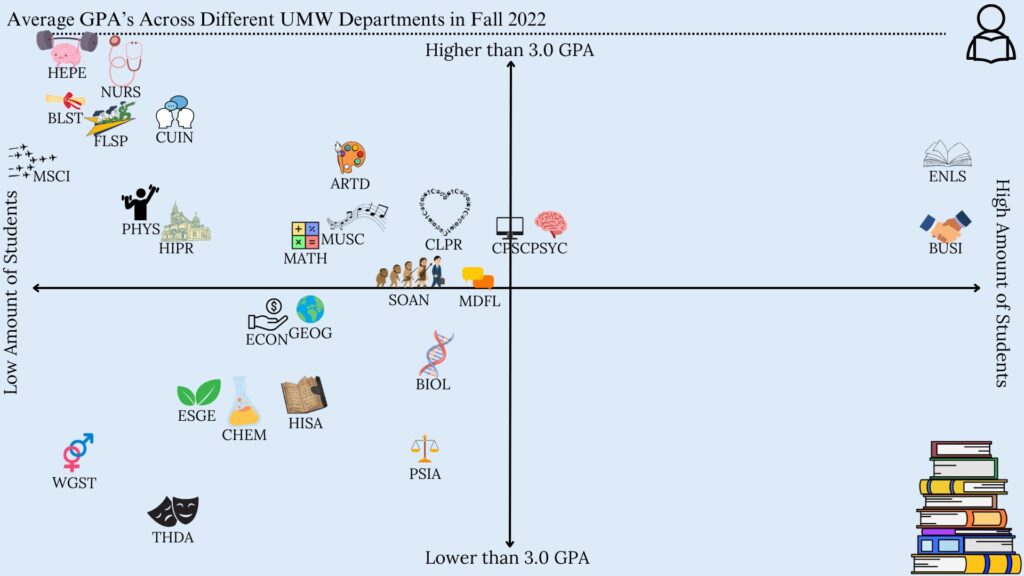
A graph comparing the GPA's averages as well as the amount of students that are in each department at the University of Mary Washington.

The Story

The main story that I could identify through the data is that departments that have a lower amount of people tend to have a higher average GPA in the Fall of 2022. These are the departments such as HEPE, NURS, and BLST. Although there were some outliers, such as ENLS and BUSI, which are possibly the biggest departments at UMW, they still have a higher GPA, but not as high as the departments mentioned before.

The Media

I chose to do an infographic chart that would show specifically where each department at UMW would land in terms of GPA average and the amount of students in each department. I did an x/y-axis sort of graph, where the more you went up the graph, the higher the gpa. As well as the more you went to the right of the graph, the more students that were in each department. This could also help in easily comparing different departments to each other. 

The Process

I chose to use Canva in order to create my infographic. Canva is very easy to use, and has many free items to use that helped get my story across. I could easily edit the size, color, as well as the position of the data in the chart. It was also very easy to download as a JPEG in order to upload it to anywhere I want.

Credits

I found the data that I used on the UMW’s site for Institutional Analysis and Effectiveness and I used the 2022-2023 Grade Distribution Summary. I only used elements in Canva in order to create the infographic chart. Any extra clip-arts were also found on Canva, such as the student symbol in the corner and the stack of books. 

Data Driven Storytelling

My Media Project

Word Cloud that shows most common Baby Names in New York City in 2011. The names that were the most common show up the largest on the picture.

The Story

The story being depicted here is that is that popular boy names are more commonly used than popular girl names. There are many possibilities for the reason behind this; there are more variations in spellings for girl names, boys are more likely to be named after other family members, or because parents tend to be more creative and unique when it comes to naming their daughters. Whatever the reason may be, the data speaks for itself, boy names rank higher than girl names.

Type of Media

I used a Word Cloud to depict the popularity of certain names. This media shows words (or in this case, names) that are more common as bigger and words that are less common as smaller.

Process of Making the Media

To make this chart, I used excel to organize the and then I used wordart.com to turn the data into a chart.

Attributions

I got my data from Data.Gov

Connecticut School Rates Dropping?

I decided to do my project on school rates dropping in the state of Connecticut between one school year to the next. I saw there is an increase in students with disabilities and students experiencing homelessness. I can’t pinpoint if this is the actual reason there is a slight decrease in attendance. We would have to do more research including surveys to see why exactly this is. I decided on a video project because I could utilize visuals and audio to explain possible trends in my data. I got my data from Data.Gov to use in my video.

Equipment and visuals

All audio was recorded from my iPhone. I used videos from Pixabay which I attached below in a file link. Once I compiled all videos, charts, and photos I used ClipChamp to edit all information together. From there I added my audio that I recorded from my own phone and made little tweaks to get what we have today! I uploaded it to YouTube as I did before to another project.

Credits

Mayo Clinic article regarding Covid-19 timeline. CDC covid-19 vaccine information. I personally didn’t utilize any AI for this project however I can’t speak to any media I credited above.

Data-Driven Storytelling

Media Project

Story Summary and Data Links

My story is about the poor reading scores of American students. Although the data shows that scores have dropped since Covid, they show much more than that. The data also shows that more than half of American children have been reading below grade level since the assessments began, in 1992. As my story develops, I focus on why reading scores are so low, who it impacts the most, and what our leaders are finally doing about it. Data Link: https://www.nationsreportcard.gov/reading/nation/scores/?grade=4

My Chosen Media

I chose to use ArcGIS Storymap to tell my story. This felt like the best media to use because it allows me to share charts and graphics, alongside text to explain and expand the story effectively.

Making the Media

I used my MacBook to create the media. ArcGis allowed me to have a free public account. Although it does not give access to every feature, it was more than enough for this project. I’ve used ArcGIS Storymap before for other projects, and I was a little excited to use it again. I found instructions about how to embed it into WordPress, and fortunately it worked!

I used Excel to create a few of the charts, using data from The Nation’s Report Card. Some of the data that I wanted was not downloadable. In these cases, I used exciting charts and gave attribution to the author.

Attributions

I did not use any AI in this project. 

Photo by Thirdman, Pexels.com

Photo by   RDNE Stock project , Pexels.com

Photo by Pixabay, Pexels.com

Photo by  apmreports.org

Photo by  Arizona Department of Education 

Photo by lexialearning.com

Information from:

Senate.Gov

Lexia Learning

APM Reports

The Policy Circle

Finding Hope…

Audio Podcast & Video

nature scene of a rocky peak with silhouette of girl releasing birds and sparkles that form the word HOPE
Created using picsart and unsplash stock photos by me, Kim Frisbee

Audio

Audio for my podcast was recorded using invideo.ai because I thought I’d be able to edit the file once the audio was finished from the same source and application. This proved difficult and I also couldn’t find where I’d saved the file on my computer and decided to just use Microsoft Clipchamp which was a lifesaver once I was able to locate the audio file on my laptop.


Kim’s Corner: On Hope

Attributes:

This video was made with Clipchamp

Pictures and stock videos from Clipchamp Content Library. I also included personal pictures that I’ve taken with my Samsung Galaxy phone as well as digital pictures that I created with PicsArt Studio for Android and Web. Audio was recorded through invideo.ai.

Transcript

Today I’m going to talk to you a little bit about HOPE and what that means to me personally and hopefully show you how it can help you through even the stormiest seasons of life.

So, what is hope anyway? Well, I think hope is a uniquely personal response to challenging times. For me, as a Catholic, I find my greatest hope comes in my personal trust that God will see me through these hard times because He has gotten me through some really dark times before. And it is that trust that keeps me holding to the hope that this too shall pass.

Some other ways to cultivate hope in your own life include:

Daily Gratitude Practice: Start or end your day by listing three things you’re grateful for. It might seem small, but it refocuses your mind on the positive.

Scripture Meditation: Reflect on hope-filled Bible verses. Pick one each week and meditate on its meaning.

Journaling: Write down your thoughts and prayers. It can help you process emotions and see progress over time.

Acts of Service: Helping others can shift your perspective and bring a sense of fulfillment.

Worship Music: Listen to uplifting songs that remind you of God’s promises.

Connect with a Mentor: Seek wisdom and encouragement from someone you trust within your church or community.

Hope is a unique, yet powerful ally for change. So embrace it, nurture it, and let it guide you on your journey and know that wherever that journey takes you, whatever challenges you face, there is always hope – and you are not alone.

Thank you for tuning in and may God bless you always. Until next time, this is Kim’s Corner. 

Data story

Media report

An infographic portraying the differences between the fall semesters of 2019 and 2020 at UMW.
Via Canva
A graph portraying the number of students for the fall semester of 2019.
Via Google Sheets
A graph portraying the total F percentage of each department for the fall semester of 2019.
Via Google Sheets
A graph portraying the number of students for the fall semester of 2020.
Via Google Sheets
A graph portraying the total F percentage of each department for the fall semester of 2020.
Via Google Sheets

Topic

You can find both data sets here. I used undergraduate fall 2019, and undergraduate fall 2020. I wanted to highlight the differences that COVID-19 had on the number of students and the total F percentage grade and compare the data between the two semesters. I found that fall of 2020 had almost three thousands less students compared to fall of 2019. I also found that the total F grade percentage from fall 2020 is almost three percent higher then the total of fall of 2019.

Media reflection

Instead of making a video or a podcast, I chose to make an infographic. For data sets, I felt this was the best option, as I didn’t know how to incorporate sounds or visual elements. An infographic was the best way for me to showcase my data trends.

Process

I chose to use Canva to make my infographic. I chose a premade infographic with an aesthetic I liked and customized it to fit my data report. I then used Google Sheets to make the graphs you see at the top of the post. I only used my computer to use this project.

Credit

For my pictures of graphs, I used Google Sheets to generate them. For my infographic, I used Canva. I did not use AI on this project.

Final Project

For my final project I am going to build out my main domain.

I am going to make it so that I can use it in job interviews or place it on my resume.

css.php