My Interactive Video Project

A Short Introduction On The Topic Of My Project

For my project, I wanted to incorporate some elements of well-known fairytales, and combine it with my favorite hobby: baking. For example, I added in a Grandmother-like figure as the owner of the bakery, similar to the Grandmother in Red Riding Hood from the Grimm Fairy Tales. I wanted her to be inviting and warm, but also strange and unsettling, which the Grandmother was when she was really the Wolf in disguise. I also wanted the setting to be a bakery, not just because I like to bake, but because I wanted to do a twist on the candy house from Hansel and Gretel. The contents inside the bakery are strange and alluring, which I took from the aforementioned fairytale. Finally, I had experimented with creating interactive, choice-based games before, and I liked the aspect that you can make a multi-branching, complex story web that the player can control. Like Roshan Topno says in his article about the connection between choice-based games and movies (which you can read here), the dialogue and choices are crucial to the story. Every option leads the player down a different path, which can be good, bad, or just strange.

The Process Of Making My Project

For the making of my project, I chose to do a purely text-based game, where the choices mattered to the plot of the story. As someone who had done a similar project in the past, and also enjoys writing, I found it to be the perfect medium to convey my story. Moreover, since I wanted to take inspiration from fairytales, I thought it would be best to make it feel simple and story-like, where the players could “flip through the pages” each time they made a choice. However, one of the biggest challenges I faced was trying to come up with multiple endings. It was hard trying to remember what every link led to and what I wanted to do with the plethora of choices that all needed their own path and ending. Of course, I figured it out, and I ended up really liking the finished product.

Click The Link Below To Test Out My Interactive Project

Click Here To View And Play My Interactive Project!

Instructions For Potential Players audience

Instructions are straightforward. Just click on the dialogue option button that is most appealing to you and commence the story. Then, continue making choices until you’ve reached the desired ending. Use the back button on the top right hand corner to reverse a choice.

Credits

A special thanks to inklestudios for platforming my interactive game
My Received Postcards!

Post Crossing is an online program where users can send and receive post cards within a network of members across the world. It’s recognized by Dr. Katie Blake, a social & cultural psychologist, who emphasizes the importance of drawing these tangible connections with people, and she writes extensively on her blog about how it exactly makes us all feel more whole.

While it is a fairly simple process to get involved, the real fun is in building a collection of received cards. I created a display that showcases some of the postcards that I have received, and included the place in which they came from in the visual below.

How to Navigate

You can click through the above story map by using the arrow on the right. By clicking through, the image of the postcard will appear, along with a point on the map that is associated with where it was sent to me from. This really put things into perspective, considering that they all ended up in the same place in the end (my mailbox in the U.S.A).

Here is a direct link to the story map on it’s original website as well, in case you would like a full screen experience!

Credits:

This story map was created by using the StoryMapJS program available on Knight Lab

All photos of postcards uploaded by myself or listed users on PostCrossing!

My Process

I chose this story map interactive aid as a way to showcase both the photos of my received cards along with a map of where they have all come from. It was a lot of fun to pinpoint the coordinates, and observe how they ended up alongside one another when I finished it completely. I did not include all of my postcards, just my favorites, and so it was somewhat difficult to choose which ones to show. I decided to aim for no repeated countries. I could do another one of these to show my sent postcards, too. I think that would be pretty cool to see alongside this project.

Electrical Circuit Word Challenge

Introduction

I have worked on several projects involving electronic components. When I first started, learning the technical vocabulary helped me better understand how the components work and how they are used in different projects. Since this is a project, I would like to make something interactive that teaches people about electrical basics. I was drawn to focusing on circuit related vocabulary.

Try My Interactive WordMaster Game

Electrical Circuit Word Challenge

In this activity, you will guess words related to electrical circuits. The goal is to become more familiar with common electronics terms while having fun.

Instructions:

  1. Open the WordMaster game using the link above.
  2. Try to guess the hidden word in six attempts.
  3. Green letters mean the letter is in the correct position.
  4. Yellow letters mean the letter is in the word but in the wrong position.
  5. Gray letters mean the letter is not in the word.
  6. Use the feedback to figure out the correct word.

What Can You Learn?

This activity introduces several important electrical terms. These words are commonly used when learning about electricity. By playing the game, visitors can become more familiar with the vocabulary and understand how these terms relate to electronics.

My Process

I chose to share this because I am interested in electronics and I thought something based on my interests would be interesting to share. I wanted to make something that would be simple for people to use even if they have never heard of electronics before. I chose to use Flippity WordMaster because I felt that people could learn through guessing a word and it would be simple even without detailed instructions. I used Flippity to make this using words related to circuits. I thought about making sure the words were easy for people to guess but still related to my topic. I wanted it to be simple and fun for users to play. I believe that the interactivity demonstrates my purpose because people are truly doing something rather than just reading. By giving them feedback and having them guess to learn more about electrical terms, people will find that they are more interested in learning about basic electronics.

Credits and Sources

Chronicling Somerset Beach

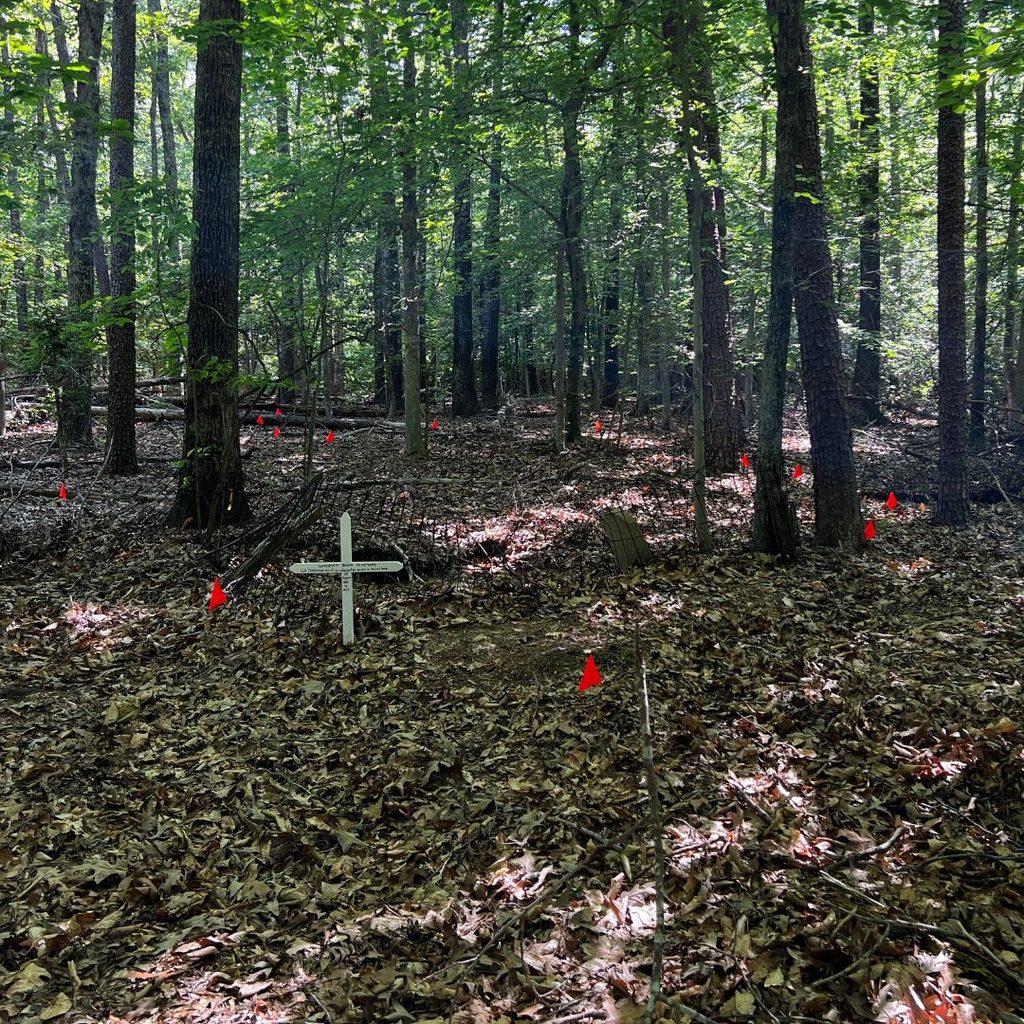
Image of Somerset Beach Cemetery

What is Somerset Beach?

I chose the title Chronicling Somerset Beach for my project. This may be the final title of the book which I will eventually publish. Sand & Gravel is also a title I’m considering.

Somerset Beach is located in King George, Virginia, on the Potomac River. The land today is privately owned. Ownership has changed many times, and the land, which was originally 676 acres willed to Benjamin Grymes, has been divided ever since. I currently own lots 1 & 2 in block 28. You can see block 28 on the 1896 plat in the timeline.

I have spent the last five years researching the stories that took place there over the decades. In the spring, I will be creating a publicly accessible database that will allow anyone, particularly descendants of the African American community, to learn more about their ancestors. I have a website (it currently needs an update), and you can view it here to learn more.

I also built a Find A Grave page to document the names of the people buried there. This was an undocumented cemetery, and I got it listed in a central database for the state of Virginia called VCRIS. Visit the Find A Grave page here

Using TimelineJS to Tell a Visual Story

The timeline below, created using TimelineJS, gives some visual details of the story over several decades. The timeline will appear, and an arrow on the right margin of the page lets you click forward through time. I plan to use other tools to create a visual story of lot sales over time and how the land was divided.

View the Chronicling Somerset Beach timeline here

The Process

For some time, I have wanted to create a timeline feature for my website; this was a fantastic opportunity to get that started. Right now, it is very basic, and I will spend time learning how to polish the appearance. Although the process was tedious, once I understood what the spreadsheet template needed, the end result was easier than I expected. I had many of the images but did need to research additional images for the project.

Interactivity Project

Experiencing a New Mexico Sunset

Introduction

Sunsets are beautiful natural events, but people can experience the same sunset in very different ways. The way we choose to interact with nature influences what we see, how we feel, and the memories we take away from the experience.

Research from the National Park Service explains that spending time with nature can contribute to the well-being of oneself. Likewise, The American Psychological Association has also talked about positive effects that nature can have on mental health and stress reduction.

Resources

Nature Makes You… (U.S. National Park Service)

Nurtured by nature

Interactive Project

Instructions

Click on one of the choices to explore a different perspective of the sunset. Each path focuses on a different aspect of the environment and shows how our attention can shape our experience of nature.

Interactive Game

Credits

Photography and Footage

New Mexico Sunset video by Ava Hild

New Mexico orange sunset picture by Ava Hild

New Mexico orange blue sunset and landscape picture by Ava Hild

New Mexico orange sunset and landscape

Interactive Tool

Twine Twine / An open-source tool for telling interactive, nonlinear stories

My Process

I chose to use Twine because it allows users to make choices and follow different paths through a story. This worked well for my message because my goal was to show that people can experience the same sunset in different ways that also depends on what they choose to focus on. Users can choose to focus on elements such as the sky, mountains, trail, or a moment of reflection. Each choice leads to a different image and explanation and while all users begin with the same sunset, their experience changes based on the choice they make. One challenge I encountered was learning how to incorporate images into Twine and making sure they displayed correctly. I tested multiple image-hosting methods before finding image URLS that worked within the project. I also tested every pathway to make sure the links worked correctly and returned users to the beginning so they could explore other perspectives.

Day of a Student Lifter

Introduction

Many college students struggle to balance the workload of college and their personal lives. Throw in a job on top of that and its borderline impossible. The stress load of it can being overwhelming for many and makes college at times unenjoyable. A good, healthy way to combat this is to pick up weightlifting as there has been benefits proven from picking up the hobby. Obvious benefits like strength and bone health from Mayo Clinic. Also, less noticeable ones like improved confidence and time-management skills National Institutes of Health.

Interactive Project

College Life- A New Day

Instructions

In this game, you begin your day as a college student and you a set of tasks to complete. Throughout the day, you will make choices that decide how your day will turn out. Each decision you make, there is a consequence as you will have to sacrifice one or the other. Depending on your choices, you will form a pathway which leads to different endings in the story.

About the Project

This project is supposed to simulate a student maintaining and balancing a healthy lifestyle with weightlifting, good sleep, schoolwork, and work. This allows users to make the decisions and try to adjust based on their choices. It also even gives some users an idea of what it’s like to have some of these factors that they may not have now such as a gym routine or job.

The Process

For the project, I wanted to use Twine as I thought it was simple to use and made an easy story that portrayed my project idea well. Twine allows me to create crossroads that make decisions matter and form pathways. The format focuses on decision-making which gives the user a chance to interact with what I’m portraying without just telling them about how time-management is important and weightlifting is great. The path you decide gives feedback on your answer and how it impacts you. The only challenge was not making the story too long or over complicated as there were a lot of options I initially wanted to include such as more options for the workouts, decisions on breakfast, lunch/dinner options, etc. I simplified it down to make it easier for the user and to not make it too long or repetitive. I would however, in the future want to continue it a little more to potentially add those options and expand it.

Credits

Mayo Clinic. “Strength Training: Get Stronger, Leaner, Healthier. “National Institutes of Health (NIH). “Strength Training at Any Age.”

Game Inspiration

Interactivity Project: Women in the SBC

About My Topic

This project connects back to my research narrative from the audio and video assignments about why women are leaving the American evangelical church, but it narrows the focus down to one specific denomination, which is the Southern Baptist Convention. Instead of just looking at this like a dry timeline of church events, I wanted to focus on the deep structural issues, theological debates, and gender expectations that define how women’s roles have changed over time inside America’s largest Protestant church network.

My project focuses on how traditional environments, domestic expectations, and structural changes intersect with a woman’s path toward leadership. For nearly 200 years, women have basically been the economic and spiritual backbone of local church life, funding global missionary efforts and running community outreach groups. However, even though they did so much of the heavy lifting to build the denomination from the ground up, their access to formal administrative authority and pastoral roles has been constantly restricted by massive institutional shifts. This timeline walks you through that history step by step, starting with early volunteer societies in the 1800s and tracking everything up to the high-profile church votes that just happened in June 2026.

Final Product

How the Timeline Works

For this project, I made an interactive historical timeline using the website TimelineJS by Knight Lab. The way the timeline works is by clicking the large gray arrows on the left and right sides of the media box to move forward and backward through the dates. You can also click on the little year blocks along the bottom axis to jump straight to a specific slice of history. On the slides with YouTube videos you just click the red play button in the middle of the video containers to watch the original church business meetings and floor debates, which I was able to embed so that they play at the exact time I want the viewer to watch.

Building the Project

After going to the Knight Lab website, I opened up the TimelineJS tool. The website gave me direct instructions and a Google Sheets template to build the project. I watched their instructional video as well and found it quite helpful. First, I filled out the spreadsheet template by adding the specific dates, headlines, photos/media, and history text for each slide. Next, I went to files, clicked share, and selected the “Publish to the web” option to make sure the data was live. I then copied my spreadsheet’s web address, pasted it into the generator box on the Knight Lab site, and copied the final iframe code to display the timeline right here on my blog.

Copyright Permissions

Because the YouTube videos I wanted to use were under “© 2026 Baptist Press. All rights reserved.” I had to email Baptist Press to request permission to use their videos for this project, and they quickly responded to me and gave me permission. It was quite difficult at first to find photos and videos that were copyright-free, but thankfully I was able to use the Southern Baptist Historical Library & Archives, which allows anyone to use their photos as long as they are given proper credit and attribution.

Technical Challenges

The other big technical challenge I encountered while testing the project was getting those modern YouTube videos to load. The timeline kept showing a blank box because standard web links contained complex livestream tags and hours-and-minutes time markers. I resolved this issue by using the YouTube embed button to copy the code, and I made sure to click check on the box that gave the exact time to start. This generated clean links that successfully forced the video players to work right when those specific historical moments happened.

Sources

The Southern Baptist Historical Library & Archives

The Houston Chronicle’s Abuse of Faith Investigation

The Baptist Press YouTube Channel

Baptist Women in Ministry’s Remembering Addie Davis

The Southern Baptist Convention Wikipedia Page

The Wikipedia Archive on Southern Baptist Abuse Tracking

Dr. Beth Allison Barr’s Historical Essay Archive

Interactivity

Introduction

Skincare may seem complicated on the surface, but is made of simple components anyone can learn!

Activity

Instructions

Clicking on the red dots on the timeline will add a new step to explore. When the card appears, click on the arrow in the bottom left of each card to read the description.

Credits

Activity made through genially template.

Images from:

Photo by https://kaboompics.com/ from Pexels:

Photo by Alena Darmel from Pexels

Photo by Shiny Diamond from Pexels

Photo by SHVETS production from Pexels

Photo by Ksenia Chernaya from Pexels

Information for each card were sourced from the YouTube channel Beauty Within’s videos:

Sunscreen, Toners, and Serums

The Process

I chose these flashcards for my project as they could be put in sequential order, has pictures, and descriptions for each picture. Skincare can seem really complicated and overwhelming at first. This format puts it in a much simpler “study” format to get people started. The actual making of the flashcards was relatively plug and play on Genially.

Interactive Game Project

Introduction

About the Game

For this project, I made a a virtual breakout game using the website Flippity.net. The way the game goes is by clicking a red lock and typing in the answers in an empty block that was given. After typing in the answer, you click the key. If you get the answer correct, it will go back to the first page with the locks and the lock you answered correctly will unlock and turn green. If you get the answer wrong, there will be a sound that sounds like a lock not opening because the wrong key is being used. You can press the lightbulb to get a hint for each question. When you finally answer all of the questions and all the locks are green, you can refresh the page to start over. This is meant to be an educational and interactive game about tea.

More Information

This game is based on my podcast and video titled, “The Science Behind the Perfect Cup of Tea.” I got all the information I talked about on those platforms from these two websites:

The Science of the Perfect Cup of Tea The Science of Tea

While playing the game, you can either look at those two websites for the answers or either listen to my podcast or watch my YouTube video for the answers:

Process of Making the Game

Process

After going to Flippity.net, I clicked on the Virtual Breakout game option. The website gave me instructions on how to create the game.

Flippity Virtual Breakout game creation instructions.

First, I was given a Google Sheets template where I can edit the clue, hints, and answer sections. Next, after I filled out the Google Sheets template, I went to files, clicked share, then clicked the “Publish to web” option.

Google Sheets template used to create game.

I then copied the link that was given to me and clicked on the “Get the Link Here” tab on the Google Sheets Template. As states by the instructions, I pasted the link on cell A3, and clicked on the link on cell A5 to see the game that I created.

Google Sheets template showing how to publish game to the web.

Message

Since this was supposed to be an educational game, I wanted it to be like a quiz. I was thinking about flash cards but decided that the virtual breakout game was a more interesting concept. I want viewers to memorize the things I discussed on my podcast and YouTube video. In my opinion, this game was a good way for viewers to fully memorize and understand the things that I have discussed about tea.

Final Product

This is the game that I have created:

The Science Behind the Perfect Cup of Tea Virtual Breakout Game

Interactivity Project

Diversity in Barbies

For my project, I explored how the groups Barbie represents have changed since the dolls were first produced. I think my project illustrates how slowly Mattel integrated diversity into Barbie. The idea that girls can be anything is central to Barbie’s marketing, yet the dolls tend not to reflect the true variety of people, though the brand is surely developing.

Sources

I used information from

Mattel’s History of Barbie Diversity

Image titled “The First Black and Hispanic Barbies” from page

History.com’s “Barbie Through the Ages”

Image titled “Original Barbie” found in this article

Mattel’s Barbie Fashionistas Dolls

Images titled “Barbies with Different Body Types,” “Barbies with Physical Disabilities,” “Barbies with Down Syndrome,” and “Barbies with Autism” found on this page

The National Down Syndrome Society’s Barbie Dolls with Down Syndrome

Interactive Timeline

Creating the Timeline

I used the Nightlabs timeline creator to illustrate this change in representation. I thought it would be the best format because it is an organized way of presenting chronological information. I made one slide in the timeline for each new group represented. The images I chose are copyrighted; however, I believe that they are within fair use because I am making commentary. I also direct my viewers to the original source of each image in the blog post and timeline. I had a difficult time embedding it because I didn’t know about WordPress’s custom HTML feature. I did a quick Google search, learned how, and successfully embedded my project.

css.php