What is Real on the Internet?

Digital blue background with Earth graphic. Bold title card"Fake News".

False Information on the Web

For as long as the internet has existed, so too has its signature circulation of false information. The rapid speed that information can be uploaded at often makes it difficult to verify. When you combine this with the constant war for an audience in the digital attention economy, you get a proliferation of clickbait headlines, fake news and more.

AI’s Contribution to False Information on the Web

I believe that generative AI has made distinguishing fiction from reality far more challenging on the internet. This has led to false information being digitally consumed at a greater rate, which further incentivizes those who generate it to make more content in order to turn a profit. AI can be used both intentionally and unintentionally to spread false information, although I believe the former is more common than the latter nowadays since AI hallucinates less absurdly than it used to. For example, there have been recent instances of AI used in scams like this one against the elderly to spread disinformation in order to turn a profit (by stealing money).

AI Models’ Bike Lessons: An Analysis

When I asked NebulaONE’s bots to teach me how to ride a bike, here were its responses:

Frankie Wulf (fwulf):
How do I ride a bike? Explain the process of learning and any advice. Please include sources in your response.

Response:

Learning to ride is easiest when you practice balance first, then pedaling, steering, and stopping.

  1. Choose a safe setup
    • Use a flat, open, traffic-free area such as an empty parking lot or paved playground. Beginner training programs start in traffic-free environments before moving to roads.[doc1]
    • Wear a properly fitting bicycle helmet every time. The American Academy of Pediatrics recommends sport-appropriate helmets for bicycling and replacing a helmet after a crash, damage, or outgrowing it.[doc2]
    • Check the bike’s brakes, tires, chain, and bolts before riding.[doc1]
    • Lower the seat so you can place both feet comfortably on the ground while learning.
  2. Learn balance
    • Sit upright, hold the handlebars lightly, and push yourself along with your feet.
    • Look ahead—not down at the front wheel.
    • Practice lifting both feet briefly and gliding in a straight line.
    • Practice gentle turns and controlled stops. Balance-bike training commonly builds these skills before adding pedals.[doc3]
  3. Add pedaling
    • Put one pedal slightly forward and near the top of its rotation.
    • Place your stronger foot on that pedal.
    • Push down firmly to create momentum, then place the other foot on the second pedal and keep pedaling.[doc4]
    • Keep your eyes focused where you want to go. Small, smooth handlebar movements are better than sudden turns.
  4. Practice stopping
    • Squeeze both brakes gradually and evenly.
    • Slow down before putting one foot on the ground.
    • Practice starting, riding a short distance, stopping, and repeating. Beginner programs specifically teach braking while maintaining control and then putting a foot down.[doc1][doc4]
  5. Build control
    Practice these separately:
    • Riding in a straight line
    • Wide left and right turns
    • Starting and stopping
    • Avoiding cones or other harmless obstacles
    • Looking behind briefly while continuing straight
    • Signaling only after you can ride one-handed safely[doc1]
  6. Move to roads only later
    First become comfortable controlling the bike in a traffic-free area. Then practice on quiet streets with an experienced adult or qualified instructor; road training should include visibility, communication, junctions, and hazard awareness.[doc1][doc5]

Advice that helps:

  • Practice for short sessions—about 15–30 minutes—rather than continuing after you become tired or frustrated.
  • Have a helper walk beside you, but avoid holding the bike continuously; letting the rider correct their own balance helps them learn.
  • Don’t use training wheels as the only method for learning balance; gliding with feet on or near the ground is a more direct way to develop balance and control.[doc3]
  • Keep your arms relaxed and pedal steadily. Looking at the ground, gripping the handlebars tightly, or making abrupt steering movements makes balancing harder.
  • Expect a few falls. Practice on smooth ground, avoid steep slopes, and stop if you are hurt or too tired to control the bike.
  • If progress stalls, take a beginner cycling lesson. Programs such as Bikeability offer training for children, teenagers, adults, and families.[doc5][doc6]

Sources

  • American Academy of Pediatrics: “Helmets Save Lives & Reduce Risk of Traumatic Brain Injury” [doc2]
  • Bikeability: Cycle Training for Everyone [doc5]
  • Bikeability Plus: Balance and Learn to Ride [doc3][doc6]
  • BCP Council: Bikeability Learn to Ride [doc4]
  • Learn Cycling: Bikeability Training Modules [doc1]

How do I ride a bike? Explain the process of learning and any advice. Please include sources in your response.

Response:

How to Ride a Bike

Learning Process

Basic Preparation:
Start on flat, smooth ground in daylight with safety gear[doc1]. Wear a helmet to reduce head injury risk by approximately 60%[doc2], along with knee and elbow pads[doc1].

Adjustment:
Set your seat low enough that your feet touch the ground while seated—this gives you control and confidence[doc1]. Test the brakes by rolling the bike next to you[doc1].

Step-by-Step Learning:

  1. Balance First: Start by gliding with both feet on the ground, pushing yourself forward while sitting on the saddle. Keep your eyes up and looking ahead, not down[doc1]. This builds balance without pedaling.
  2. Single-Foot Gliding: Place one foot on a pedal and push off with the other foot on the ground. Maintain balance and switch feet to practice both sides[doc3].
  3. Single-Foot Pedaling: Begin using one pedal to move forward while keeping the other foot ready to catch yourself[doc3].
  4. Full Pedaling: Place both feet on the pedals and pedal in a steady rhythm. Keep your gaze forward and avoid looking at the pedals[doc3].
  5. Braking: Use smooth, controlled braking rather than squeezing too hard[doc1]. Practice stopping gradually.

Timeline: Most beginners start balancing within hours of practice, with full comfort developing within days of consistent effort[doc4]. Short 20-30 minute daily sessions work better than long, tiring sessions[doc3].

Safety Advice

Essential Gear:

  • Helmet fits 1 inch above your eyebrows with snug chin strap[doc1]
  • Wear bright or reflective clothing; flashing rear lights reduce collision risk by up to 33%[doc2]
  • Closed-toe shoes for better grip and control[doc3]

Riding Habits:

  • Keep eyes forward and on the road, not down at your pedals[doc1]
  • Maintain a relaxed body posture rather than gripping handlebars tightly[doc4]
  • Practice in safe areas like empty parking lots, quiet parks, or playgrounds away from traffic[doc3]

Common Mistakes to Avoid:

  • Looking down at the front wheel (causes imbalance)[doc4]
  • Braking too suddenly or too hard[doc4]
  • Riding in low-visibility conditions as a beginner[doc1]
  • Tensing your body, which interferes with balance[doc4]

Traffic Safety:
Use hand signals—extend left arm for left turns, bend elbow up for right turns, and palm down for stopping[doc5]. Ride with traffic and maintain proper distance from parked cars to avoid “dooring” accidents[doc2].


Sources:

  • [doc2]: BikeTips Cycling Safety Guide
  • [doc5]: Ultimate Bike Safety Rules Guide
  • [doc1]: wikiHow How to Ride a Bicycle
  • [doc3]: Sport Hiatus Step-by-Step Guide
  • [doc4]: Cycle Inspire Easy Step-by-Step Guide

Frankie Wulf (fwulf):
How do I ride a bike? Explain the process of learning and any advice. Please include sources in your response.

Response:
Here’s a step-by-step guide to learning how to ride a bike, along with practical advice and insights from reputable sources.


1. Prepare Your Bike and Gear

  • Bike Fit: Ensure your bike is the right size. When sitting on the saddle, your feet should touch the ground (for beginners). Adjust the seat height so your legs are slightly bent when pedaling.
  • Safety Gear: Wear a properly fitted helmet, knee pads, and elbow pads to protect against falls. Closed-toe shoes are recommended.
  • Location: Choose a flat, open space with smooth pavement or grass (grass can soften falls but may make balancing harder). Empty parking lots or quiet streets are ideal.
  • Bike Check: Ensure tires are inflated, brakes work, and the chain is lubricated.

Source: National Highway Traffic Safety Administration (NHTSA) – Bike Safety


2. Learn to Balance

Balancing is the most critical skill in bike riding. Here’s how to practice:

  • Remove Pedals (Optional): For complete beginners, especially children, removing the pedals and lowering the seat can help focus on balancing. This turns the bike into a “balance bike.”
  • Scooting: Sit on the bike and push off with your feet to glide. Lift your feet for short distances to practice balancing.
  • Steering: Practice turning gently while gliding to get a feel for how the bike responds.

Source: REI Co-op – How to Teach a Child to Ride a Bike


3. Practice Starting and Stopping

  • Starting: Place one foot on the ground and the other on a pedal positioned at the 2 o’clock angle (higher than the other pedal). Push off with your foot on the ground, then place it on the other pedal and start pedaling.
  • Stopping: Squeeze the brakes gently (don’t grab them suddenly). Shift your weight to one foot as you come to a stop and put it down to steady yourself.

4. Pedaling

  • Once you’re comfortable balancing, reattach the pedals (if removed) and practice pedaling while maintaining balance.
  • Start with short distances, focusing on smooth, even pedal strokes.
  • Look ahead, not at your feet, to help with balance and steering.

5. Steering and Turning

  • Lean, Don’t Jerk: To turn, lean your body slightly in the direction you want to go. Avoid jerking the handlebars, as this can cause you to lose balance.
  • Practice Figure-8s: Ride in a figure-8 pattern to improve control and coordination.

6. Braking Smoothly

  • Use both brakes evenly to avoid skidding. The front brake provides more stopping power, but using it too hard can cause you to flip over the handlebars.
  • Practice braking at different speeds to get a feel for how the bike responds.

Source: [League of American Bicyclists – Bicycling Skills](https://bikeleague.org/content/ bicycling-skills)


7. Building Confidence

  • Short Rides: Start with short rides in a safe, low-traffic area. Gradually increase the distance as you gain confidence.
  • Practice Falling: Falling is part of learning. Try to relax and roll if you fall to minimize injury.
  • Ride with Others: Riding with experienced cyclists can help you learn faster and feel more comfortable.

8. Common Mistakes to Avoid

  • Looking Down: Always look ahead to anticipate obstacles and maintain balance.
  • Stiff Arms: Keep your arms slightly bent to absorb shocks and maintain control.
  • Pedaling Backwards: Pedaling backwards can engage the coaster brake (if your bike has one), causing you to stop suddenly.
  • Overcorrecting: If you start to wobble, don’t jerk the handlebars. Instead, steer gently and focus on balancing.

9. Advanced Tips

  • Shifting Gears: If your bike has gears, practice shifting to find the most comfortable pedaling resistance for different terrains.
  • Riding in Traffic: Once you’re confident, learn the rules of the road and practice riding in low-traffic areas before venturing into busier streets.
  • Maintenance: Regularly check your bike’s tire pressure, brakes, and chain to ensure it’s safe to ride.

Source: Bicycling Magazine – Bike Skills


10. Mental Tips

  • Stay Relaxed: Tension makes it harder to balance. Take deep breaths and stay calm.
  • Practice Regularly: Short, frequent practice sessions are more effective than occasional long ones.
  • Celebrate Progress: Learning to ride a bike takes time. Celebrate small milestones, like balancing for a few seconds or riding a short distance.

How Long Does It Take to Learn?

  • Most people can learn the basics in a few hours to a few days, depending on age, coordination, and practice frequency.
  • Children often learn faster than adults due to their lower center of gravity and fearlessness, but adults can learn just as effectively with practice.

Source: Verywell Fit – How to Ride a Bike as an Adult


Final Advice

Learning to ride a bike is a skill that, once mastered, stays with you for life. Be patient, persistent, and kind to yourself during the process. Happy riding!

Right off the bat, I can say that OpenAI’s sources were far superior in quality compared to Anthropic’s or Mistral’s. OpenAI used six sources; over half were verifiable government websites and/or .org articles. On the other hand, Anthropic used five sources, all of which came from everyday news websites and even WikiHow– which we all know are not reliable. Mistral used five sources– one of which led to a deleted page– and only one was a government website.

Despite the questionable sources, I can say that all three programs gave appropriate advice to answer my question. They all suggested learning to balance before pedaling, for instance. They all listed common mistakes to avoid while learning, too. I can’t say which one worked the best, because all of them did what I asked them to in an orderly fashion. If I had to choose one, I’d say OpenAI is the program to go for, as it uses the most reputable sources.

Who is the internet for?

A colorful drawing of an eyeball looking at a website and an ear hearing noise. Meant to convey website accessibility artistically.
Image from Big Human Web Accessibility Design Blog

The internet is a beautiful place for everyone, no matter their abilities or background; it is for all. Whether you are using the internet as a creative space, a way to connect with people around the world, or to learn a new skill through the power of YouTube and a generous teacher who took the time to create a video for people like you, the internet has it all. 

Openness

Why?

Sharing is caring! Not only do you benefit from others creating and sharing on the internet, but by allowing others to see and learn from your work, you can bring more creativity and human connection to the internet. The more open the internet is, the more you can see how beautifully creative humans are, and trust me, there is a huge difference between an AI creation and a human creation.

How?

By creating your content to be free and open access to all, you are helping the internet be a more open place for all. This could look like using platforms like YouTube to share content for free, designing flexible content that can be accessed from a multitude of devices, whether that is a smartphone or a laptop, or allowing visitor feedback on your blog, website, or any other form of content creation.

Accessibility

Why?

Whether you realize it or not, we all benefit from the internet being accessible even without having a disability. You don’t need to have a vision impairment to benefit from having the option to listen to audiobooks instead of reading a hard copy book. Everyone can benefit from a website that uses easier-to-read fonts like Verdana, Arial, and other sans-serif fonts, even without having a vision or reading impairment like dyslexia. No doubt you have used closed captions while watching a video, that is just one of many forms of accessible content.

How?

Creating accessibility on any kind of platform can feel like extra work, but it doesn’t just make it easier to use; it can make it more aesthetically pleasing. By having brand colors that can make words and different aspects of your website stand out, you are both helping make your website easier to navigate and creating a more visually appealing website. You can do this by putting important navigational text in headings and using contrasting colors for the background and text to help the text stand out. Don’t forget to use Alt text on all images, buttons, and icons; this allows screen readers to fully convey your information to anyone with visual impairments. There are so many ways to create accessible content, and with a little use of the open web, you can find helpful resources explaining exactly what to do and how to do it.

Read more about creating accessible content on the Intuit Social Responsibility Blog

Who is the internet for?

Graphic of an image with the words, It's for everyone, which relates to who is the internet for.

According to the website Tenet, 1.3 billion people (16% of the world’s population) live with a disability that affects how they use the internet.

Web Accessibility Statistics from Tenent

Openness

Why is this important?

Helping others, getting advice, and constructive criticism are all reasons openness on the internet matters. You don’t have to face the world alone.

How

Eliminate paywalls; don’t make me give up my email; allow users to have open access without giving up personal information unless you have something really valuable to offer; and even then, don’t be stingy- don’t be that person.

Accessibility

Why?

16% of the population is why! That’s a lot of people who could be missing out on what you’re offering. Are you offering knowledge, a podcast, a product? That’s a lot of potential lost revenue. The why really relates to who you want to see your site.

How

Use smart design elements and guidelines for making your site accessible; use alt text for images, and when including a link, give it a description so there’s a clue where it goes. The Government Services Administration published this page about accessible design: https://www.section508.gov/blog/benefits-accessible-design/

Who is the Internet For?

A picture of different hands coming together to put puzzle pieces together.

The internet is a place where everybody can come together and share many thoughts, feelings, and ideas. It’s also an important educational and business tool. It’s very important that the internet is welcoming and easy to use for everybody.

Openness

Why?

When the internet is open to the world, people are able to learn many new things. When you share your work, people can learn from you and eventually add on to your ideas.

How?

To help make the internet open, you can make sure the work you publish is open and free to view. This will allow people to see your amazing work and be inspired by it!

Accessibility

It’s important that the internet can easily be used by anyone no matter their differences or needs. If not, many people won’t be able to interact with others and their work on the internet.

Why?

How?

The internet is filled with options that you can use to make it more accessible. For example, tools like closed captions, audio transcripts, and voice-over tools can always help your work become accessible to people with disabilities.

Audio Eye Accessibility Guide

Who Is the Internet For?

The internet should be a place that everyone can use, regardless of their background, abilities, or the technology they use. Openness and accessibility are important because they allow more people to find information, communicate, and participate online. Making the web open and accessible helps ensure that the internet can truly be for everyone.

Openness

Why?

Open content allows information to be shared and used by more people. This is important because the internet is most useful when people can easily access information, learn from it, and share knowledge with others.

How?
Content can be made more open by using resources that allow people to share and reuse information. Creative Commons licenses are one way creators can clearly explain how others are allowed to use, share, or adapt their work.

Accessibility

Why?

Accessibility helps make sure that people with different abilities can use and understand online content. Making websites accessible creates a more inclusive internet and allows more people to participate online.

How?

Web content can be made more accessible by adding descriptive alt text to images, using proper heading structures, providing captions for videos, using descriptive hyperlinks, and making text easy to read. The Web Accessibility Initiative also provides guidelines for creating more accessible web content.

Laptop displaying a connected world map surrounded by symbols and messages representing equal access, inclusion, and an open internet for everyone.

Who Is The Internet For?

At the end of the day, the internet is for everyone! When we have the tools to make the internet accessible, we should use them everywhere we can.

Openness

How?

Some ways to make my content available and consumable to everyone is by using numerous different internet platforms in various mediums and outsourcing my content to others for advice and constructive criticism. Putting my content out on different social media platforms allows for more people to see my work, and also letting others guide me on the best ways to make my work accessible means that more people can consume it.

Why?

I want to ensure that everyone who accesses the internet encounters no obstacles when it comes to consuming content. There are already so many other financial, location, and privilege-based barriers to the internet, so I should do everything in my power to break down said barriers.

Accessibility

How?

I believe that using audio transcriptions or bright video examples to supplement my internet content guarantees that those with audio or visual disabilities can consume anything I make.

Why?

At the end of the day, it is your moral responsibility to ensure that the content you produce on the internet is accessible to everyone. Everyone deserves a choice in whether or not they consume content on the internet. When you don’t make your content accessible, you make that choice for them, which is unfair.

A simplified image of a person in front of a computer which displays non-specified examples of accessible vs. inaccessible internet content.

Additional information on internet accessibility:

Who is the internet for?

The world is showing the internet being shared to everyone.
Image from askleo.com

Openness

Why

I would like to make content open because I want to make work available for others to view, modify, and/or use themselves without them having to pay for it. The web is for everyone to use.

How

Methods I can use to make content open are articles on Wikipedia, how-to videos on YouTube, online e-books, and many more content.

Accessibility

Why

I might want to make accessible content because with accessibility, you can make the design of products and experiences usable by as many people as possible regardless of ability or disability.

How

Methods I can use to make content accessible are designing posters so that the text has a high contrast against the background color, turning on captions so that deaf people can understand the video, and sharing a written transcript of the spoken information in a presentation.

Guidance on Web Accessibility and the ADA

Who is the internet for?

From our assignment this week, I believe it is safe to say accessibility is not only important in the real world, but online as well.

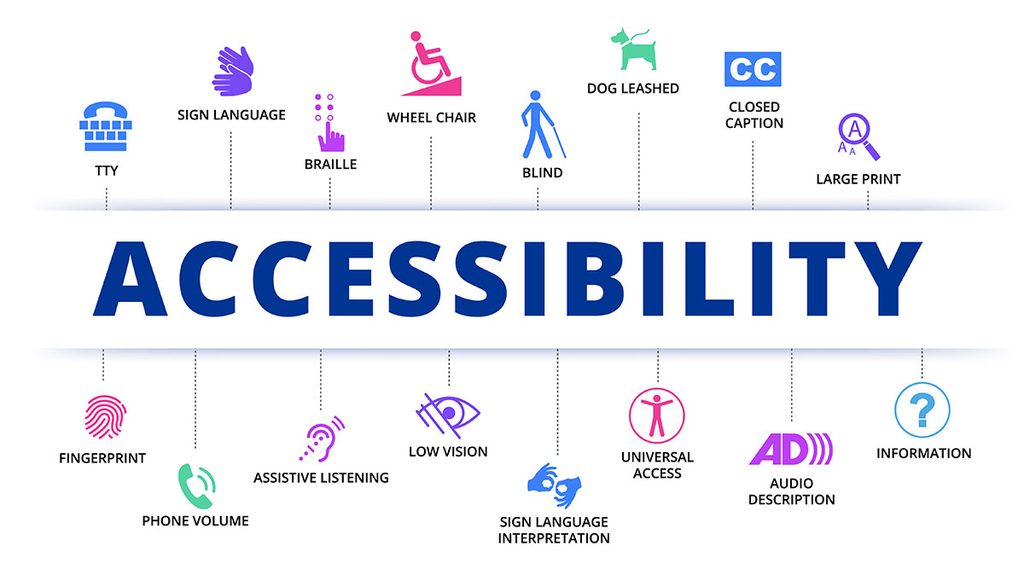
This is a graphic, showing different types of Accessibility.

Openness

How?

There are so many ways to make your website open to other people’s contributions. For example, this Blog! We are able to edit and put out own information for the whole class to see.

Why?

The internet being open is one of the things that make it so helpful to a wide arrange of people. Allowing anyone and everyone to post their thoughts and share them with the world. It gives people the opportunity to express themselves or even discover things they wouldn’t normally be able to without it.

Accessibility

How?

Now, there are so many ways to make your information accessible. We can provide closed captions on videos, or audio. There are now features on several video apps that provide you with audio descriptions of the photos or videos you are watching.

Instagram is a very popular app that is used all over the world. Their developers are starting to include several new ways to make the app more accessible. Instagram’s policy on Accessibility.

Why?

Accessibility like I said before is something that is important in all spaces. Everyone should be able to explore the open internet, even if it’s in their own way.

Who Is The Internet For?

Openness

Openness refers to the transparency of knowledge, connection, and communication without boundaries for users. This essentially creates a wide space for people to access information and community.

Why?

It is useful to make material on the web open for other users. For example, Ted talks share lots of information in each video, and it’s completely open to all users on the web. This also creates a connection with the information being shared and can open the doors for community and networking as well.

How?

Users can exercise openness on the web by helping others build skills, influencing, sharing opinions and thoughts, and much more. By posting and sharing, users can expand their knowledge and experiences, which can be extremely helpful when navigating life.

Accessibility

The creation of guides, tools, and infrastructure in order to connect with every kind of person, whether they have a disability or not.

Why?

To reach people, you need to think at their level. “What can I do to fulfill this person’s needs?” Some people need to read content if they are deaf, or to hear content if they are blind. Others might have a hard time focusing and need to speed up videos/audios. There is a spectrum of possibilities and details to consider why we need to make our creations accessible.

How?

Some tools that creators can use to make their creations accessible include transcripts, captions, and audio.

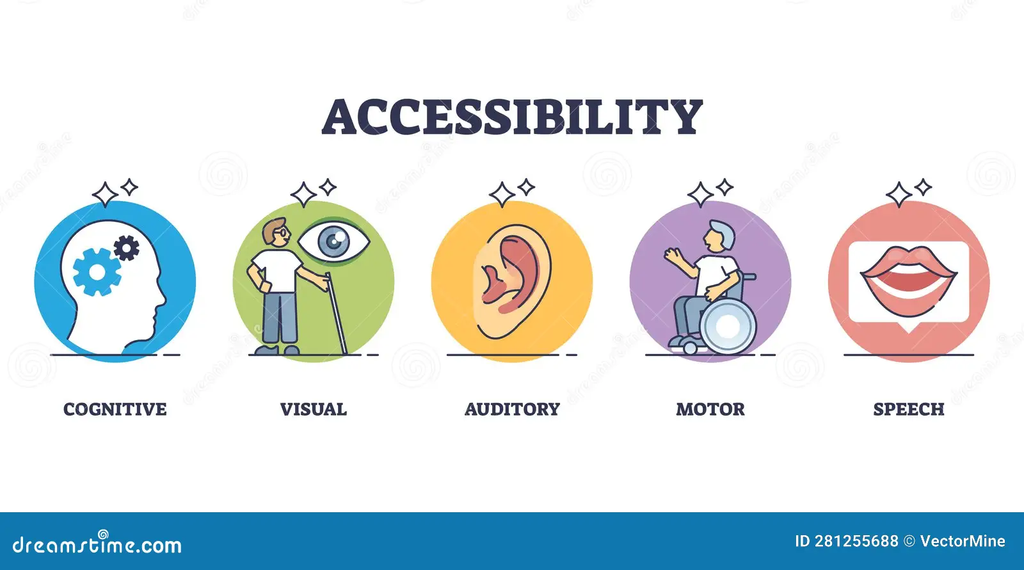
Accessibility chart showing 5 important factors: cognitive, visual, auditory, motor, and speech.

Read more on why accessibility is important: The Importance of Accessibility: A Comprehensive Exploration

Who Is The Internet For?

From what I’ve learned an accessibale web is a needed web. Most of the things we are used to when using the web such as speeding up videos, captions, and alternative text that shows how to use a website is all part of the accessible web. Even if we may not need it oursleves it is helpful so just think the impact it creates on someone who really does need it. So many people now are creating post and vidoes that include these because it just the right thing to do and the more accessbile your platform is the more people will view them and continue to do so. It important to be understanding and relaize though it may not effect you it’s somone elses daily sturggel so why not make it a little easier?

Openness

Why?

Openness on the internet is the ability to share without needing permission. An open web is open to the public for anyone to access, use, and share. Openness prevents single companies from hiding, blocking off, or preventing access to information, and it allows the internet to remain free. While nothing is 100% open, creators can still make the choice to be open with viewers. Having openness on the web is important because it helps people to have freedom of speech and creates a chain of innovation where people can bounce thoughts and ideas off of each other and create a networking chain. It makes it so that anyone can access information. If being a good person isn’t enough of an incentive, you may also get ad revenue or funding through sponsors for being open.

How?

There can be some hurdles to jump when it comes to having an open web, but you just have to advocate for yourself and your viewers’ rights and privacy. Safety is a number one priority, and a good way to do that is by supporting companies that deal specifically in keeping away harmful network controls. Openness is a spectrum: your work can be 100% free, but doesn’t have to be. An example of having an open web is things like publishing a step-by-step on how to do a craft but making the viewer pay for the final result.

How to protect the open internet and resources on how to get involved.

Accessability

Why?

Web accessibility matters because it affects who can view content and whether they return to the site. Being accessible boosts views on a website because, even though we may not know it, we are using accessible website tools. For some people, it is a must, so why not take the extra time to create an inclusive website?

How?

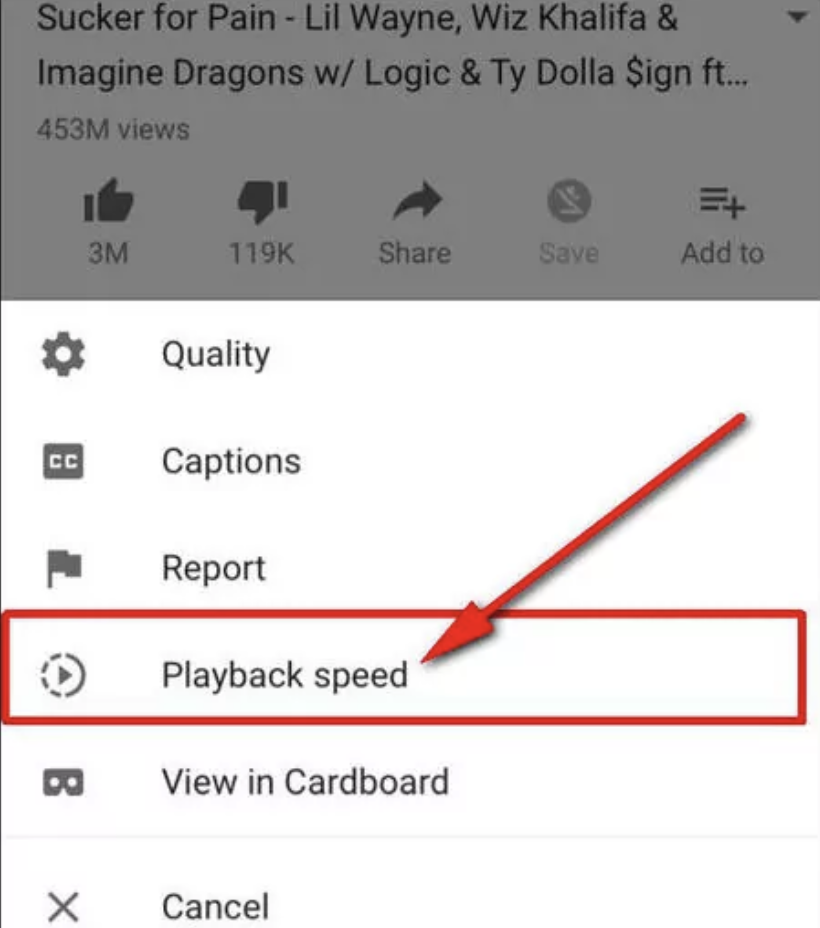
Ways to make the web accessible that you may already be doing. Such as putting captions on a video, adding a playback speed, or even adding alternative text explaining how to use and navigate a website.

The image shows where to find the playback speed on a YouTube video.
css.php