Video Work in Progress

My Shot List

Test video

This is my test recording. I used my phone to record, a tripod for stabilizing and a mix of natural light and artificial light.

Information on Equipment

For filming, I am going to use my phone. I’m using my phone because while I would have liked to use a video camera but my computer doesn’t have a space for a memory card insert and I don’t have an adaptor. It also helps that I’m familiar with my phone’s camera whereas I would have had to learn how to use the video camera. For my stabilizer, I’m using a simple phone tripod. My lighting is a mix of natural and artificial light. I put my tripod up by a window, but I also have a clip on ring-light to keep the lighting as consistent as possible. I chose the lighting mix because I prefer the way natural light looks but I know that the lighting levels won’t stay the same throughout the process if I rely solely on natural light.

Information on My Shot List

For my video, I plan to use a mix of videos of me talking and some B-Reel of footage of student. Using a mixture of these clips will format my video similar to a video essay. I think that if I filled my video of just me talking, it would bore viewers, but if my footage was all videos of students with my voice over top, that would make viewers feel unconnected to the content. Hopefully, I will be able to find the perfect mix of clips that doesn’t bore viewers but also doesn’t make the video feel like a podcast with stock footage. The main type of shots I want to get are students working, whether that be together or independently, the video’s topic is how getting involved effects students grades so I want to show the students studying or being academic. In addition, I will add students engaging in student involvement for the topic of finding a support network, because that part makes less sense to show students studying.

Video *test*

Shot list

Test footage

The first scene is how I plan to record for the majority. The second scene is one instance of how I can do close-up, medium, and wide shots. The third scene is another instance of the shot wides with camera movement. For the shot transitions, in the final project, I will cut in between the takes to make a cleaner cut.

Equipment

For this video project, I plan to use a tripod for stabilizing my phone, which is what I plan to record with. I wanted to use these specific materials because I want the camera to be stable and for me to look properly lit. Without these materials, the video would be shaky and not look right.

What and why, visual media

I plan to shoot myself in a quiet, zen-like room to convey the feeling of ASMR and how it makes us feel. ASMR is known for producing feelings of calmness and relaxation. I think filming in a quiet room will produce better sounds for ASMR and feelings of tranquility.

Video Test

Shot list

Video Test Recording

Equipment

I am going to use my phone to shoot the video. I will use a tripod in some scenes. I will help with the shots that don’t have much movement to keep it steady. I plan on using the natural lighting of the room or place I will be filming in. If the lighting in the room does not look good in the video I will look into other sources of lighting, but the places I will be filming it is easier to use the light already in the rooms and that comes in from windows in the rooms.

What & Why

I am going to be filming various crochet coaster pieces and my hands crocheting and the yarn isle at Micheal’s. I think this fits with my podcast topic as I am talking about the coasters that I am making to give to my siblings for Christmas, so it fits ti show the completed product and the process of making one.

My Visual Project

What’s up, homiesss!? I’m not going to lie: this semester is eating me up but you know we persevere (insert crying smile emoji).

Although the assignments in this class are really fun for me, I wish I didn’t have to squeeze time into my schedule to do them because of the workloads of my other classes (more specifically, my capstone course. God, I can’t wait for that to be over with). On the bright side, I always have an assignment to look forward to!

In this post, I’m going to be telling (and showing) you guys all about the shots and shooting of them for my final module 8 video project! If you remember from my last audio project, the audio was about overcoming gym intimidation and any intimidation that comes with starting a wellness journey in general. For this project, I’ll be creating visuals to lay into that audio!

First things first: The Shot List

I’m going to write my shot list according to the actions that I do while getting ready and going to the gym, because that’ll be easier for me to film on filming day.

An excel sheet of my shot list, detailing the shots I plan to get when I film

These shots are intended to paint a picture of what someones routine could look like if they do the work on themselves to overcome their gym intimidation. They’re intended for the audience to see themselves in the shots. I hope to invoke a sense of discipline, growth, and the reality that growth is a journey to be enjoyed.

Equipment

I’ll be using some different equipment:

  • Canon 850D
  • iPhone 15 Pro, Cinematic Mode (I think I’ll primarily be using this)
  • Tripod

As for lighting, since I’ll be filming in a 24/7 public gym, I want to be respectful of the space and the people in it, so I won’t be bringing a ring light or anything. I think that will add to the ‘grunge’ of the shots though!

Test shot

I didn’t get a chance to go to the actual gym that I’ll be filming at because I’m dying in the name of school assignments right now so I took a test shot in the gym in the basement of my parents house when I stopped by to grab a few things today because the lighting is similar to the gym I go to (you’ll see in the final project). Cinematic mode does wonders!

Me, in my basement surrounded by gym equipment, being silly for the test shot:)

Video Project Checkpoint

Shot List

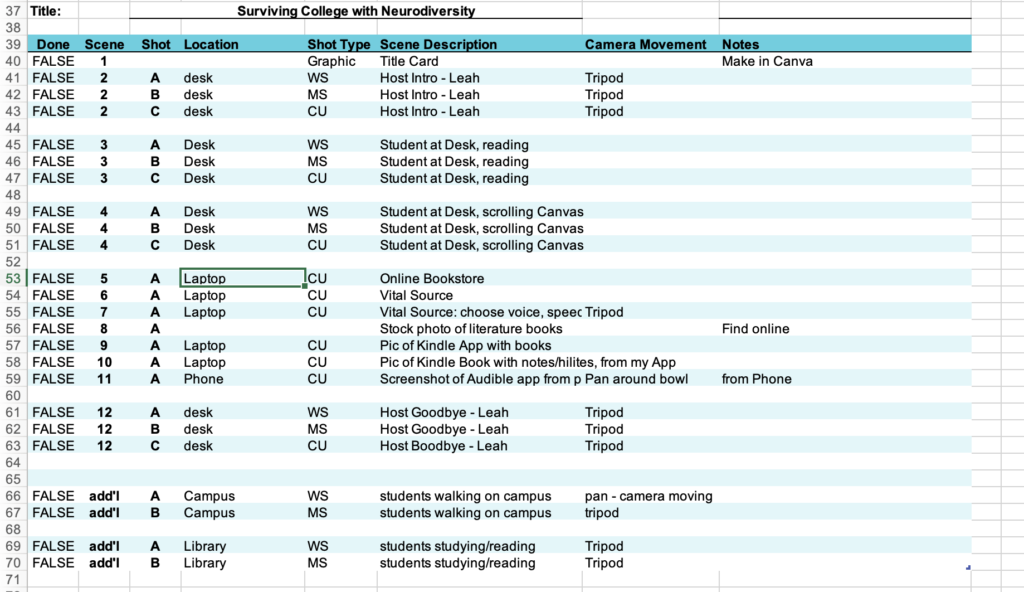
This is a picture of the shot list, that shows the list of photos and videos I plan to capture for my video

Test Recording

Video Equipment

For this test recording, I used my iPhone with iKross tripod. 

My Video Plans

For my video, I am using a combination of videos and still photos that I create, combined with a few stock photos. Because I am talking about text-to-speech software, I will take a few short videos from my laptop of the software itself, in addition to a few photos from my laptop and phone. I will also take wide and medium-shot videos of students on campus using my tripod and a moving camera since the audience of my video is intended to be college students. To illustrate a student reading a book and working on her laptop, I will record wide, medium, and close-up shots of this. These videos will support my discussion about choosing digital versions of texts instead of traditional print texts.

Your Shrinking Attention Span: A Video Essay

About this video

This video discusses how low attention span can cause you to make errors in your work/studies. It then discusses some tips and tricks you can use to increase your attention span and your concentration. Some of the tips discussed are reading long form content such as a book, and increasing the amount of exercise you get in an effort to improve blood circulation. At the end, some bonus tips such as mindfulness are thrown at the viewer to encourage them to do additional research on tips they might find helpful. Sources used for this video include CBS News, George Washington University, and Kansas State.

Credits/Attribution

Music for this video is Moonlight Drive by Yunior Arronte downloaded via bensound. Stock internet footage was used royalty and copyright free and was “Frustrated Teenager” recorded by Tima Miroschnichenko downloaded via pexels.

Behind the Scenes

This video was an attempt to adapt my similarly titled podcast about shrinking attention spans. I used my iPhone to record the video using a tripod and microphone checked out from the HCC front desk. Using a tripod was helpful as I was able to set up a stable video at any point and at differing heights. The microphone provided much better quality audio and reduced instances of background noise versus the iPhone’s built in microphone. Since I recorded the footage on an iPhone, and was going to edit on my Mac laptop, it made sense to stay in the Apple ecosystem and edit using iMovie. I uploaded my video as an unlisted video on Youtube, as I already had a YouTube account and knew how to upload to the platform.

Podcast Outline & Test Recording

I used AI to help generate an outline for my podcast episode, and then edited it based on how I wanted to do it! The episode will be recorded in my kitchen using my iPhone, because I will use the espresso machine for sound effects. My topic is How to Make a Latte at home. I chose this topic because I love coffee and make myself lattes almost every day.

Podcast Episode Outline: How to Make a Latte

Introduction (15 seconds) 

  • Brief welcome and introduction to the episode. 
  • Mention what listeners will learn: the steps to make a perfect latte at home. 

Ingredients and Equipment (20 seconds) 

  • List necessary ingredients: 
  • Freshly brewed espresso (1-2 shots) 
  • Milk (whole, skim, or alternative) 
  • Optional: flavored syrups or sweeteners 
  • Mention essential equipment: 
  • Espresso machine or stovetop espresso maker 
  • Milk frother or steam wand 
  • Coffee cup 

Step-by-Step Instructions (1 minute) 

  1. Brew the Espresso (15 seconds) 
  • Explain how to brew 1-2 shots of espresso. 
  • Tips for using fresh coffee beans. 
  • *Include sound of espresso being brewed.  
  1. Froth the Milk (20 seconds) 
  • Describe how to heat and froth milk using a steam wand or frother. 
  • Ideal temperature for milk (around 150°F). 
  1. Combine Espresso and Milk (15 seconds) 
  • Pour the frothed milk over the espresso. 
  • Tips for creating latte art (optional). 
  1. Add Flavor (10 seconds) 
  • Suggest adding flavored syrups or sweeteners if desired. 

Conclusion (25 seconds) 

  • Recap the steps briefly. 
  • Encourage listeners to experiment with different flavors and milk types. 
  • Invite feedback or questions from listeners. 
  • Mention the next episode topic or a call to action (e.g., subscribe, follow on social media). 

Outro Music (5 seconds) 

  • Play brief outro music as the episode concludes. 

Test Recording

Video Project

My Shot List

Color coded shot list depicting scene descriptions.

Test Recording

Most of my scenes will take place in my living room with similar lighting.

Equipment

What?

I plan to use my IPhone as the primary recording device. I don’t have a tripod, so I plan on using alternative methods for stabilizing the shot. I will most likely use a stack of textbooks and some sort of phone stand to stabilize the camera for recording.

Why?

I am using this equipment because it is the most readily available to me. As a commuter, using things I have at home make it so that I don’t have to make a special trip to campus to acquire other equipment.

Planning to Shoot

What?

I plan on focusing my scenes around the topics discussed in my podcast. It will mostly include clips of my family sitting together, talking and laughing. Also, it will include scenes of my brothers and dad playing football in the front yard, which is another specific instance I talked about in my podcast. Another scene that will be included is my mom cooking ‘football food’ for the family, which is a special tradition of ours. Lastly, some scenes will be shot at the park, showing people interacting with their friends and family.

Why?

I plan to include this material because it is specific to my podcast. My podcast includes a lot of personal anecdotes regarding my topic and I want to ensure that this is reflected in my video.

Video Update

My Plans

I have chosen to do a video about my cats usual day. I want authenticity so I do not want to use much false lighting because I want the natural lighting to be an actor to the story. I want you to see the changes in time during recording. I plan on using a tripod to get a couple shots and decide how much I plan to use. All videos will be muted and I will utilize my voice to do a voice over. I choose this because without narration you would just watch a muted screen with a couple meows.

Visuals

I am going to use different recourses to create a graphic for the introduction of my cat. I will be using a couple pictures to change up the dynamic of their nap cycle (they are fairly lazy cats). I will use photo’s from my own phone (with credit to the cat food brand) to have pictures of their cat foods.

Excel sheet for shot list
Excel sheet attached below with notes to describe my shots/camera movement.

Audio Project

Audio Project UMW

Recording

To record this audio I used the app simple recorder. It was very simple to use because it is an app through apple. I was able to edit it on the app as well so I didn’t need to use any other source. I used AI to help with my outline and speaking notes for this project.

Media

I used a song called Discipline from the website Artist. This site was easy to use and copy right free. Another site i used to help me and gave me tips on how to produce a good recording was this website called 9 tips for improving audio quality of recoding.

css.php