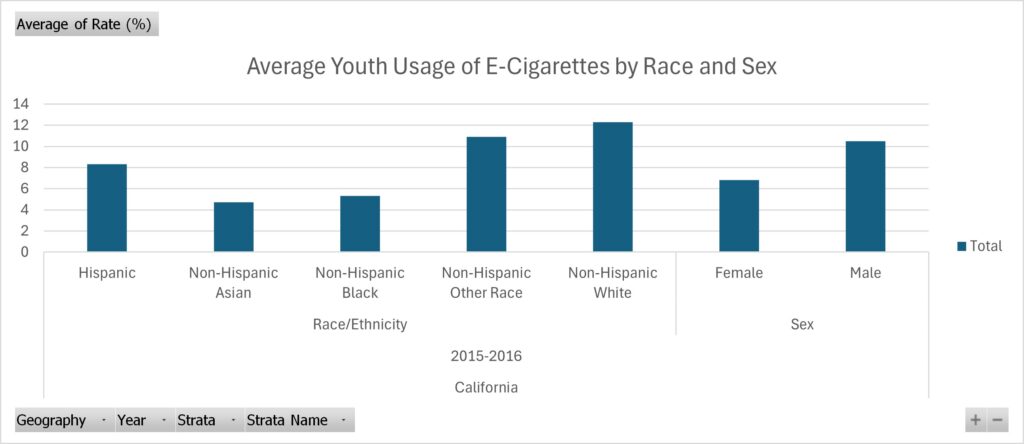
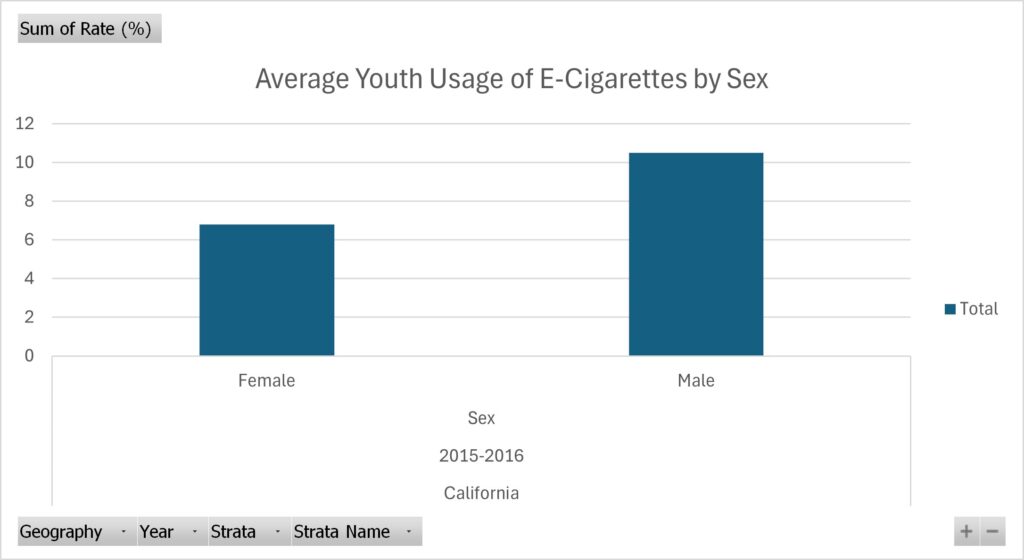
Listing the specific trends displayed within the data charts listed above
For the data I collected, I chose to inspect trends within the usage of e-cigarettes for the youth. I originally hoped to find some recent research on this done in Virginia. However, I found research done in California instead, and the most recent study I could find was done in 2015/2016. However, I think this is a great state to look at these trends in – since it’s a large state that usually sets many societal trends, including using e-cigarettes. Within the data I collected, I found a trend of white males being the most common perpetrators of e-cigarette usage. I found this data to be extremely interesting, as it defies stereotypes that usually individuals of color are the ones partaking in activities like using e-cigarettes.
The Process for Finding These Trends
The steps I took to find these specific trends within the data
I found this specific set of data on Data.gov! After a lot of research (and figuring out what story I wish to portray) I found this set of data that really pushed the story I wanted to convey – being that the use of what seems like deviant acts (such as using e-cigarettes) isn’t only by individuals of color, thus another reason why we need to steer clear from this stereotype without doing the proper research. After finding this data, I made use of the cleaning process by watching professor Berge’s video in Canvas. I removed the column that displayed the grand total of individuals that partook in the study, as well as the lower and upper 95% confidence interval because it was irrelevant information to the point I was trying to make. Therefore, once I finished cleaning the data, I isolated the different trends I wanted to highlight in their own pivot tables: one for the sex and the other for the ethnicity of youth that partakes in using e-cigarettes. I did all of this using Microsoft Excel.
What my video is about and online resources to support my topic!
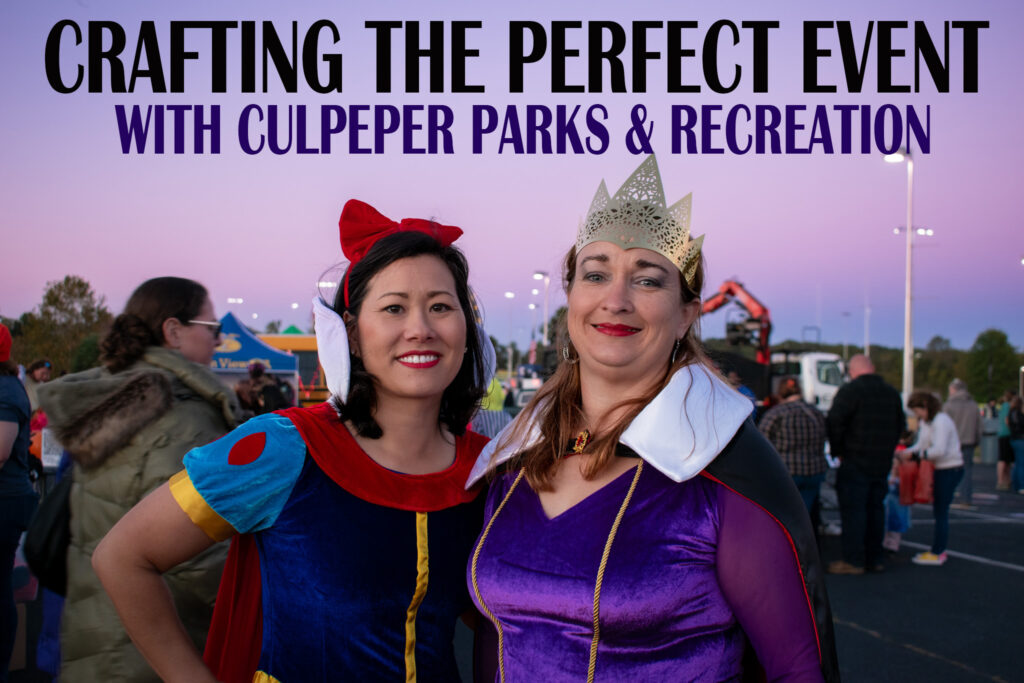
For my video project, I made a complimentary video to go along with the audio podcast I made in project 7 titled, “Crafting the Perfect Event with Culpeper Parks & Recreation”. In the video I discuss the ins and outs for creating a successful social event for the public with the advice of Culpeper Parks & Recreation, as they host several popular events every year. Within the video, I (Summer Koontz) interview the department’s Recreation Superintendent, Director and Parks Superintendent as they examine the aspects of planning, advertising and physically making an event come to life.
As I mentioned previously in project 7 when making my audio podcast, I found two helpful online resources that further discuss the important points of crafting a successful event! They are as follows:
The Event Planning Guide from Henrico.gov and provided by Henrico Recreation & Parks gives extremely detailed, and further in-depth notes of all the elements that go into planning an event for the public.
The Event Planning Steps, Tips & Checklist for planning your public event created by Projectmanager.com displays an easy to understand list and descriptions for everything needed to plan a successful event. This includes all the equipment needed from start to finish, different templates to use to stay organized throughout the process, volunteers, how to advertise effectively, etc.
The Process for Making My Video
The camera, editing software and streaming platform I chose to use for my video, and why!
While I was recording videos for my project, I was also taking pictures for my job with Culpeper Parks & Recreation. So, I used my IPhone 12 to record the videos taken, as it was the easiest to carry while also having a camera. Speaking of cameras, all of the pictures used in the video were taken by me on a Nikon D3500. Once I uploaded the pictures I wished to use for my project, I used Adobe Lightroom to edit the photos and Adobe Photoshop to add text to the photos. Furthermore, videos I used were edited together by Apple’s IMovie. I decided on this platform because I was the most familiar with it, and I find it to be extremely user-friendly for the type of video I was wishing to create. As far as the streaming platform I chose, I wanted to try something new, so although I was the most familiar with YouTube, I had never really heard of Microsoft’s Stream before. Therefore, I wanted to try it out – and I found it very helpful and straight-forward when it came to editing captions and transcripts for the video!
Credits and Attributions for My Video!
Giving the proper recognition for everything that made my video come to life!
For this project, I did things a bit backwards. To explain, the event I was covering for the podcast took place on Friday, October 18th. Therefore, I had a bit of a stricter time frame to work with. Luckily, my professor was kind enough to give details about project 8 ahead of time, so I could make sure I captured everything needed. Therefore, I had covered this event with my list last week – thus why most of the columns on the side of my list are marked “TRUE” instead of “FALSE”. So, for my shot list, I planned several recordings of various scenes such as the event environment, staff working, vendors and the people who partake in the event! Specifically covering the topics that were talked about during the interview I conducted. This way, the video being shown would have correlation to what was being said by the interviewee. I had also planned on taking several pictures that will be used supplementary as well – providing a good mixture of the two visual elements.
My Test Recording & Equipment
A Video of my Recording Conditions with The Equipment I used!
As far as capturing the visual elements of my project, I used my Iphone 12 to record the video, a Nikon D3500 to take pictures, as well as a hand-held tripod to attach to my phone for videos. I chose these specific tools because they were the most convenient items to carry around and easily capture videos and photos during a hectic event. Because my hands were rather full carrying around a camera, phone and tripod during the event – I unfortunately didn’t use much equipment in the way of lighting. However, for the majority of the event, natural sunlight that was captured in the recordings were perfect. To help make the recordings better quality, I manually switched some of the camera settings around on my Iphone as well as turning the exposure up or down on my phone during recordings to get the right kind of lighting I wanted.
This specific test video resembles the same conditions of the visual elements I captured – as they were all taken outside and (with the exception of two clips) during the day with natural sunlight. Additionally, this was taken with my handheld tripod that I used for the majority of my videos during the event as well.
In this podcast episode recreation aide, Summer Koontz, interviews the department’s director, Recreation Superintendent and Parks Superintendent as they prepare for this year’s Moonlight Halloween Candy Hunt. Within this episode, you can learn the logistics of creating the perfect public event. This includes the conception of the event, marketing and advertisement as well as building a team to make the event come to life.
Follow Along With the Written Transcript Provided Below!
Summer Koontz: Welcome! My name is Summer Koontz and today we’re diving into the art of creating a successful social event for the public. So, let’s explore the key concepts to making your event unforgettable with some advice from the department of Culpeper Parks and Recreation.
[Crowd chatter]
Summer Koontz: A successful event starts with a solid plan. Culpeper Parks and Recreation’s, Tabitha Riley, is here to help as she is currently prepping for this year’s Moonlight Halloween Candy Hunt.
Tabitha Riley: So in preparation of an event like the Moonlight Halloween Candy Hunt, involves coming up with the idea, and then it’s laying out the logistics and timeline of the event. So starting with what date we’re going to do it on and what time, and then backing up from there as far as when do we need to have vendors, when do we need to have supplies available, scheduling staff and then actually the timeline of the event. But a lot of this is also just volunteer vendors, they come in and they wanna participate and be part of the community.
Summer Koontz: For this event and many others, Culpeper Parks & Recreation’s director, Andrew Hardy, utilizes social media advertising to reach their audience.
Andrew Hardy: Our preferred model is actually utilizing Adobe Photoshop to make a variety of marketing materials. With those marketing materials, we put them on Facebook and other digital platforms to reach our target audience.
[Heavy machinery moving]
Summer Koontz: Having the right team to make the event come to life is crucial. The department plans logistics with the help of parks superintendent, Joe Koontz, and his team.
Joe Koontz: After attending the candy hunt event pre-meeting, I meet with my team the following day to go over how we’re going to set up the event, and handing out assignments for each thing that needs to be done.
[Children in crowd chattering]
Summer Koontz: With careful planning and execution, your social event can be a memorable success. Thanks for listening, and a special thank you to Culpeper Parks and Recreation’s team for joining me in this episode. Happy event planning!
How Did I Craft My Audio Project?
The Tools, Equipment and Software I used to Create My Audio Project
I used a variety of different tools when creating my audio project. As shown, my project is very interview-heavy, which can lead to complications. Many of my interviewees were very squirmish, making it difficult for the audio to pick up well. However, after some trial and error I found success with two audio devices: the built-in microphone attached to wired headphones for Apple products and a small lapel microphone that I was able to borrow from my work (at Culpeper Parks and Recreation, funny enough!). I then captured the audio using my IPhone’s Voice Memos App. Once the audio was recorded, I utilized the free audio editing software, Soundtrap. In Soundtrap I was able to put the different audio clips together, as well as some copyright-free music to add into my introduction and conclusion. As mentioned in my previous post, I made use of AI (Microsoft Copilot) in making my outline of the project. However, I altered it slightly to make all the content fit and flow cohesively.
Credits and Attributions
Giving Credit to the Resources that Made My Project Possible!
Many of the key points of focus that were included in this episode’s podcast were distributed from the following resources:
The Event Planning Guide from Henrico.gov and provided by Henrico Recreation & Parks gives extremely detailed, and further in-depth notes of all the elements that go into planning an event for the public.
The Event Planning Steps, Tips & Checklist for planning your public event created by Projectmanager.com displays an easy to understand list and descriptions for everything needed to plan a successful event. This includes all the equipment needed from start to finish, different templates to use to stay organized throughout the process, how to gain volunteers, how to advertise effectively, etc.
Music and sound affect attributions:
Introduction music: “Jetsonmade – Racket (Piano) + (Clap)” from Soundtrap.com
Conclusion music: “Vocal – Dumb 6” from Soundtrap.com
Crowd chattering, heavy machinery and children in crowd chattering sound affects by Summer Koontz from IPhone’s Voice Memos Application
Podcast episode edited by Summer Koontz from Soundtrap.com
A deeper exploration on the topic of my audio project
I am currently employed with Culpeper County Parks & Recreation, and I absolutely love my job there! Working towards the future, I hope to continue my career with the Parks & Recreation department. Therefore, I found it fitting to create this project around a crucial element of my job – public event planning. More specifically, our annual Moonlight Halloween Candy Hunt!
Crafting my Perfect Audio Project
The outline, script and equipment I will use to create my audio project
I’m beginning this project by creating an outline and script to follow – this is a pivotal part of my project because I am planning on interviewing several co-workers. Due to the conversation of AI in the previous weeks of my DGST 101 course, I found it intriguing to use AI as a resource to help create my outline. To explain, I used Microsoft’s Copilot to help produce a two minute outline for public event planning. Copilot’s suggestions were very helpful, and I did use it as a foundation for my project. However, I did tweak the outline to be bigger chunks due to my project being interview-heavy.
Click the title below to view the final outline:
Title: Crafting the Perfect EventIntroduction (0:00 – 0:15)
Introduction (0:00 – 0:15) Opening Sound: Background music with cheerful, upbeat tones.
Narrator’s Voice: “Welcome! My name is Summer Koontz and today we’re diving into the art of creating a successful social event for the public. Let’s explore the key steps to making your event unforgettable with advice from the department of Culpeper Parks & Recreation.”
Point 1: Planning, Conceptualization, Budgeting & Finding the Right Vendors (0:15 – 0:54) (54 seconds total)
Sound Effects: Pen scribbling on paper. (3 seconds).
Narrator’s Voice: “A successful event starts with a solid plan. To help further explain this concept, Culpeper Parks & Recreation’s Tabitha Riley is here to help as she is currently prepping for this year’s Moonlight Halloween Candy Hunt.” – (11 seconds)
Interview – Tabitha, Recording in Parks & Recreation Meeting Room:
“Explain to me how you produce an event like the Moonlight Halloween Candy Hunt? (What was your process for the Moonlight Halloween Candy Hunt specifically?) How do you budget for an event like this while also choosing the best vendors to make the Moonlight Halloween Candy Hunt a lively event? – (answer: 40 seconds)
Point 2: Marketing and Promotion (0:54 – 1:24) (30 seconds total)
Sound Effects: Typing on a keyboard/Clicking on a mouse. (3 seconds)
Narrator’s Voice: “Culpeper Parks & Recreation’s Director, Andrew Hardy, utilizes social media advertising to reach their audience.” (6 seconds)
Interview – Andrew, Recording in Andrew’s Office:
“So tell me the process for creating (what do you use to create) an eye-catching advertisement for an event like the Moonlight Halloween Candy Hunt? Why do you choose social media as your main source of advertisement for an event like this? (Benefits??)” (answer: 20 seconds)
Point 3: Creating your Event Hands-On, Execution and Engagement (1:24 – 1:49) (25 seconds total)
Sound Effects: Joe Instructing his Team. (3 seconds)
Narrator’s Voice: “Having the right team to make the event come to life is crucial. The department plans logistics with the help of Parks Superintendent, Joe Koontz and his team.” (7 seconds)
Interview – Joe, Recording in Work Vehicle, Outside, or in Workshop:
“So how do you prepare your team to help physically make Tabitha’s plan of the Moonlight Halloween Candy Hunt come to life?” (answer: 15 seconds)
Conclusion (1:49 – 2:00) (11 seconds total)
Sound Effects: Fading Upbeat Background Music & Children laughing/running. (Bleed into narrator’s voice)
Recording: Outside
Narrator’s Voice: “And so, with careful planning and execution, your social event can be a memorable success. Thanks for listening, and a special thank you to Culpeper Parks & Recreation’s team for joining me in this episode. Happy event planning!” (11 seconds)
Now that my outline is complete, it’s time to find the right audio recording equipment to capture my interviews. Unfortunately, I am on a stricter budget with not easily accessible means of reaching UMW’s Fredericksburg campus. So, I decided to follow the advice of Katie Thornton that sometimes less is maybe not more, but just enough! I went to my local Target store and bought a pair of wired headphones that my interviewees could wear to capture the audio and I was pleasantly surprised with how clear the audio was!
Below is a fourteen second test recording of an interview I did with Tabitha:
A noticeable difference from previous assignments is the theme of my website. Previously, my site consisted of pink elements. Of course, my website appears quite different now. Originally I made this change because I was unable to edit a site icon (favicon) with the first theme I had chosen. However, I’m quite happy with the change for different, unrelated reasons. This reason blossomed from the creation of my favicon. To explain, while I was brainstorming possibilities for my favicon in relation to my site’s name (“Summer’s Thoughts”), I found that a desperate color change was needed for my theme. To explain, my name was a major part of the correlation, I felt it was only right to add a sunshine somewhere in the favicon itself, thus the color yellow was also added. However, I didn’t wish to have an aggressive, neon yellow but rather a modern, light and breathable yellow that’s more appealing to the eye. Therefore, it was only convenient to make yellow the primary color, this way the website is cohesive throughout.
Considering this, I then created lines of a sunshine around a thought bubble for the favicon – quite literally illustrating “Summer’s Thoughts”. Creative? Probably not a whole lot, but the favicon compliments the contents of the website – and that’s the main goal. Sometimes less is more in these cases, thus to ensure that the message you’re trying to communicate doesn’t get lost. Take the favicon for WordPress itself for example. This same principle holds true in the image I created for the header of my website. Reflecting further, perhaps the concept of the header is slightly different from the favicon. I wanted to continue the idea that this website is my “thoughts”. However, I also wanted to communicate the concept that although this website contains my thoughts, it doesn’t mean that it’s “my way or the highway”. Furthermore, as someone who is an advocate for openness and collaboration on the internet, my website should be no exception. I want my website to be home for open and non-judgmental communication that allows all different thoughts, ideas, etc. Therefore, although this is “Summer’s Thoughts”, let’s now talk about them together! Thus, the header image was born. I continued the visual element of the thought bubble, but upgraded them to not only thoughts, but conversations with speech bubbles. However, since there wasn’t a lot of justification for adding a sunshine in this context, I instead displayed that same yellow color that appears in the favicon within the speech bubbles and computer screen to continue the “summery” idea.
How My Images Were Born
The process for creating my favicon and header images
Having taken ARTS 104 over the summer, I already had access and a little bit of practice with Adobe Photoshop and Illustrator. Therefore, I felt the most comfortable creating the favicon and header images there. Going a bit out of my comfort zone, I used Adobe Illustrator (usually I begin in Photoshop as it’s a bit more straightforward). However, I enjoyed this creative challenge. Although I’m not sure if it was the consensus to use real photographs, I wished to go with a more interpretative approach by sticking with illustrations instead. I felt using only illustrations allowed the idea of acceptance in not being perfect, therefore further allowing deeper and much more meaningful conversation to take place. In this case, starting with a few shapes in Adobe Illustrator allowed the idea to flourish. As aforementioned, there was a lot of little details I added throughout the two images that allowed them to be the way they are currently (and hopefully to Dr. Berge’s liking – fingers crossed!). According to Cronyxdigital.com, it is best to have all site icons be exported as a .png. This is due to the fact that PNG allows transparencies while having larger file sizes. Diversely, I exported the image for my header as a .jpg. As aforementioned, Cronyxdigital.com says that JPEG is best for websites because it is the lightest file type, which is important as it won’t slow down the website further.
After completing this week’s module from my DGST101 class regarding the importance and guidelines for copyright, fair use, attributions, Creative Commons (CC) license, etc., I’ve come to view the way we regard pieces published to the internet differently. Previously, I’ve always had preconceived negative connotations with copyright – solely based off of how unnecessarily complicated it seemed and how scary the consequences may be if you are caught copyrighting. However, I didn’t realize all of the ins and outs of copyright until now, and how it begins. Before, I had thought it would be a lengthy process to have those words usually seen at the bottom of an internet page, “This work is licensed under…” meaning that there are plausible restrictions to using said person’s work. However, I’ve now come to know that copyright begins right when the piece of work is created! In fact, it is solely up to the creator (not the US Copyright Office) on how the work is shared. Therefore, I’ve found the components of copyright to be incredibly helpful in allowing creativity, innovation, and boundaries all in the same sense. Copyright allows others to create imaginative pieces of work, while still allowing respect for the original creator – yet another amazing perspective of the internet! Reflecting on this, I chose a fairly flexible CC license for my work. I made use of the CC license chooser to help produce the best license to support my work and boundaries. Therefore, I wanted those to be able to use, remix, and work upon my original piece without being restricted to the same boundaries as myself – all while still giving myself credit for the original work.
After considering the fact that CC licensing allows for the respect of an original creator’s boundaries, it would be completely inconsiderate to ignore the guidelines of usage for the creator’s content. Thus, leading to unethical usage of another person’s work. Examples of this can be using images for a blog post, like the one above, and not attributing who and where the image originated from (assuming it didn’t come from a copyright-free resource). Instances like I mentioned previously happen more often than not, leading to bigger companies dropping requests for copyright takedowns like grenades (as cleverly put by Casey Fiesler in her TedTalk, “How the Internet and Copyright Fuel Creativity”). These grenades frequently take down pieces of work that are covered under fair rights (often for commentary, etc.) due to the fact that it’s intimidating to fight for set rights against a big company. Thus, it’s incredibly important to take the extra minute or two to ethically use other’s work by properly attributing the original creators based upon their CC licensing – in order to allow everyone to continuously be creative and innovative.
Our Contributions to the Web and Domain of One’s Own
There are lots of different aspects of the internet, as well as different roles that are simultaneously and continuously played by everyone. However, who I am on the web? What roles do I play? As I’ve endured the journey into my Digital Studies 101 class, I’ve come to know tons of different aspects to the internet, and why they’re all important. For example, I’ve learned how crucial it is to have access to the “openness” of the internet, as well as accessibility. That being said, many individuals like myself take advantage of these – as consumers of curiosity, I’d imagine. To illustrate, when “surfing the web” to find the answers to our desperate questions: “Why does…” “How do…” “What is…” etc., being a questioning persona that has Google at their fingertips was my main answer when reflecting on the question, “Who am I on the web?”. However, after deeply considering the question further, I found that my role is much more meaningful, even more so now that I have access to Domain of One’s Own. For example, a large majority of us post thoughts or portrayals of our lives through the internet – think Instagram, YouTube, X (Twitter), TikTok, even Reddit. These small pieces of information feed the internet to grow and expand further than it was a half-second ago, even your favorite memes help construct the internet. Furthermore, whenever “liking” or “sharing” other’s additions to the internet, you’re also helping shape the internet. This also takes place in checking up on your favorite websites – like Reddit or YouTube! What may seem like a small, insignificant “click” on your part, actually plays a monumental role in deeply articulating what the internet is composed of. With that being said, having access to Domain of One’s Own (thanks to UMW and my professor/DGST101 class) I can now continue my normal role as a, “consumer of curiosity” on my own unique platform and digital profile that is unapologetically myself – allowing me to further expand the internet in a creative, and architectural way! You can learn more about Domain of One’s Own, or DoOO on the Indie Web Camp website.
Therefore, on the web, we are not only “curious consumers”, but we also methodically shape and compose the internet’s elements, by clicking on our favorite websites, sharing our favorite memes, trends and thoughts – much like this page, which leads me to my next topic.
Why “Summer’s thoughts?”
Reflecting on the Name of My Domain – And How It Shows Who I Am on the Web
When choosing a domain name for my platform, I took a lot of my aforementioned information into consideration. Who am I on the web, and what am I contributing? Of course, much of the internet is fishing between fact and fiction. Which ironically, was the main topic of last week’s unit in my DGST 101 course. That being said, I wished to be more upfront and clear in this consideration. Thus, “Summer’s Thoughts” came to mind as a proper domain name. Much of my platform (I’m sure) will be my perspective and take on a variety of topics, which can and will contain facts (as the addition of outside sources always makes for a better read for both my educational instructors, and otherwise). However, much like this post, it may contain a lot of my personal opinions and outlook – or as some would call it, my thoughts. Thus, the title of this page is aptly called: “Summer’s DGST101 Thoughts”.