
For my final project, I would like to expand my main domain and include some of the work that best reflects my online identity and career aspirations. I would like to include my video and storytelling assignments, in addition to an infographic I made for another class. I would also like to include a few research papers from some of my psychology classes. The common themes for the included work will be literacy and community advocacy. Specifically, advocacy for women and underserved populations. Literacy and advocacy are two areas that I’ve been interested in since before college and areas that I have done a lot of volunteer work with. Also, I would like to find an internship in social services this summer and am considering a career in school counseling. I feel that the work that I plan to include will be a good representation of who I am to future employers.
Data-Driven Storytelling
Media Project
Story Summary and Data Links
My story is about the poor reading scores of American students. Although the data shows that scores have dropped since Covid, they show much more than that. The data also shows that more than half of American children have been reading below grade level since the assessments began, in 1992. As my story develops, I focus on why reading scores are so low, who it impacts the most, and what our leaders are finally doing about it. Data Link: https://www.nationsreportcard.gov/reading/nation/scores/?grade=4
My Chosen Media
I chose to use ArcGIS Storymap to tell my story. This felt like the best media to use because it allows me to share charts and graphics, alongside text to explain and expand the story effectively.
Making the Media
I used my MacBook to create the media. ArcGis allowed me to have a free public account. Although it does not give access to every feature, it was more than enough for this project. I’ve used ArcGIS Storymap before for other projects, and I was a little excited to use it again. I found instructions about how to embed it into WordPress, and fortunately it worked!
I used Excel to create a few of the charts, using data from The Nation’s Report Card. Some of the data that I wanted was not downloadable. In these cases, I used exciting charts and gave attribution to the author.
Attributions
I did not use any AI in this project.
Photo by Thirdman, Pexels.com
Photo by RDNE Stock project , Pexels.com
Photo by Pixabay, Pexels.com
Photo by apmreports.org
Photo by Arizona Department of Education
Photo by lexialearning.com
Information from:
Data Project Checkpoint
Virginia’s Reading Report Card, 4th Grade
Trend
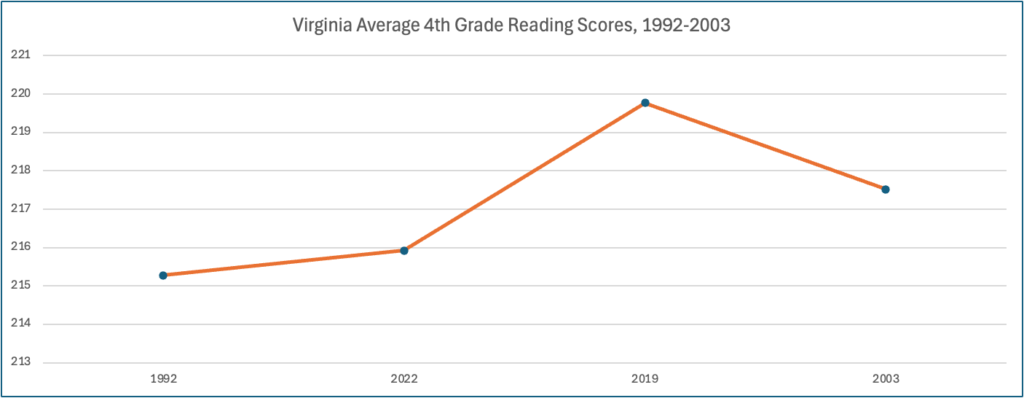
Overall, although the rate of 4th-grade children reading at the basic level was increasing from 1998 to 2019, it has declined from 2019 to 2022. The rate of 4th-grade children reading at the proficient level, which is 238, is significantly lower in 2022 than five years ago.
Process to Identify the Trend
I exported reading score data from The Nation’s Report Card into Excel. The data was collected at four different points in time between 1992 and 2002. It reports on the average score and the reading score percentiles of 4th graders from all 50 states, per collection year. I created a Pivot Table to show the average score per year for only Virginia. For 1992, some states did not collect data so I had to clean up this data before creating the Pivot Table. This is the data that I used to create my chart.
Data Link
Spreadsheet and Table Link
Video Assignment
Video: Surviving College with Neurodiversity
Information about Dyslexia
My video is about dyslexia and the benefits of using text-to-speech software.
Dyslexia is a neurological learning disability that affects reading and reading fluency. In people with dyslexia, brain images have shown differences in key areas involved with reading. Dyslexia is one of the most common learning disabilities, affecting approximately 15-20% of the population. For those affected, it can be difficult to decode words and can affect reading comprehension, writing, and spelling (dyslexiaida.org).
Text-to-speech software provides many benefits to college students with dyslexia. By enabling students to listen to the material rather than work to to decode each word, the student can engage with the content and improve their comprehension. It also promotes inclusion and accessibility by allowing students to read advanced materials independently.
Creating My Video
To create my video, I took photos using my iPhone and my iKross tripod. I was able to photograph students on the UMW campus and the UVA campus since I was there visiting during their family weekend. I also recorded a lot of screen images and videos on my laptop, since my topic is about technology. In my video, I have included some close ups, wide and medium shots, as well as video screen recordings.
I created intro and outro slides using Canva, because I was already slightly familiar with this software. I chose to upload this, my audio, and all of my images to iMovie. Although it has been a while, I used to play with this a lot in middle school so I thought it would be the easiest editing software for me to use.
I chose to stream my video on Youtube mainly because I already had an account from a previous project I worked on.
Attributions
Intro and Outro music is by Lily J, downloaded from Mixit
Graphics in Intro and Outro slide by Pixabay from Pexels
Additional information from VitalSource and International Dyslexia Association
Video Project Checkpoint
Shot List
Test Recording
Video Equipment
For this test recording, I used my iPhone with iKross tripod.
My Video Plans
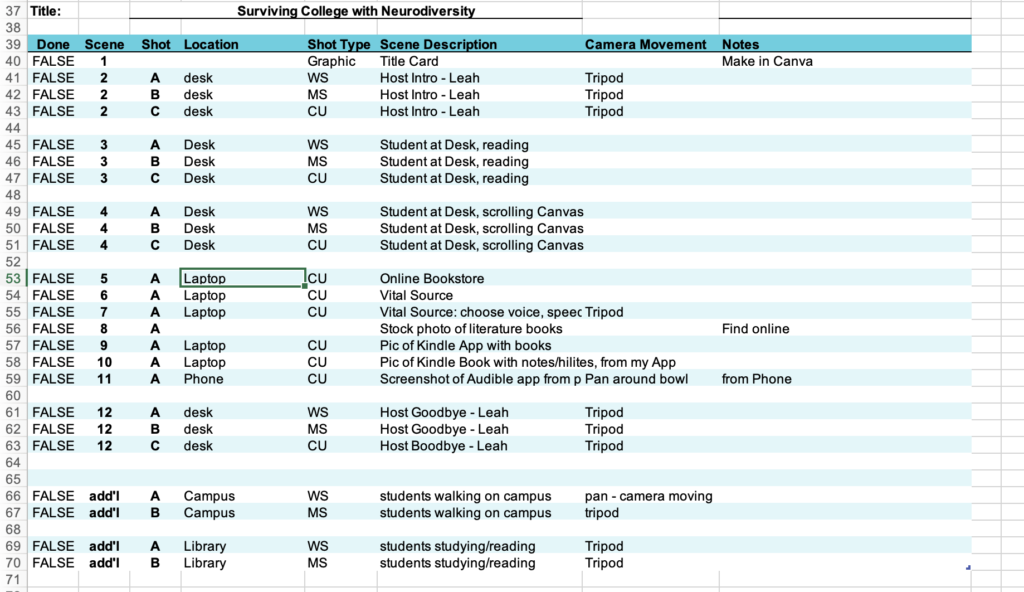
For my video, I am using a combination of videos and still photos that I create, combined with a few stock photos. Because I am talking about text-to-speech software, I will take a few short videos from my laptop of the software itself, in addition to a few photos from my laptop and phone. I will also take wide and medium-shot videos of students on campus using my tripod and a moving camera since the audience of my video is intended to be college students. To illustrate a student reading a book and working on her laptop, I will record wide, medium, and close-up shots of this. These videos will support my discussion about choosing digital versions of texts instead of traditional print texts.
Surviving College With Neurodiversity

Creating My Podcast
To create my podcast, I recorded the audio using the Voice Memo app on my iPhone and uploaded the files to my MacBook. I used GarageBand to edit the recordings and to add music and sound effects. For music, I downloaded royalty-free music from Miskit. I used Google Gemini AI to create my image, and Microsoft Copilot for initial outline ideas.
Attributions
Intro and Outro music is by Lily J, downloaded from Mixit.
Image generated by Google Gemini.
Additional information from VitalSource and International Dyslexia Association.
Transcript
Hello, and welcome to the Surviving College with Neurodiversity podcast. I’m Leah, your host, and I’m excited to talk with you about how, as someone with dyslexia, I adjusted to the huge increase in reading assignments in college by using text-to-speech software. So the problem for students with dyslexia, for example, is that it just takes a very long time to read. It’s also much more difficult to comprehend the reading and retain the information. And with the sheer increase in reading assignments that college students face, it can be very overwhelming.
The first piece of advice I’ll give any student with a language-based learning disability is to always purchase the electronic version of the text. This is simply because most electronic versions will usually have some text-to-speech option, which we’ll just refer to as TTS. Now, I’ve purchased electronic texts through several different online vendors, and my preference is VitalSource. I like this platform because it offers several features that are user-friendly. You can choose a reading voice, and they don’t sound computerized. They’re very easy to listen to. Also, you can choose the speed which you’d like to have your text read.
Sometimes, you might be assigned a literature book. If you’re able to, I really like to purchase these on my Kindle with the Audible extension. In the Kindle app, I can highlight and take notes while I listen along using Audible. But I also listen to the Audible at other times, like when I’m walking around campus or driving in a car. This enables me to make the most of the time I have available.
That’s all we have time for today. Thanks for joining me, I hope I was able to show you some new tools that you can use in your college classes, that will help you be efficient and successful.
Podcast Outline
Surviving College with Neurodiversity
Finding the best text-to-speech (TTS) software to help with college-level reading assignments is important for students with language-based learning disabilities. Many students with disabilities like dyslexia struggle with the volume of reading assignments in college. Students with dyslexia, for example, take longer to read and usually have difficulty comprehending the reading and retaining the information. In my podcast, I will review the best TTS software for college students with dyslexia.
Script Outline
I used Microsoft Copilot for outline ideas but ended up writing my own outline. However, Copilot gave me some valuable suggestions that helped me get started.
- Intro (0-20 seconds)
- Introduction Music
- Intro Topic
- Hello, and welcome to the Surviving College with Neurodiversity podcast. I’m Leah, your host, and I’m excited to talk with you about how, as someone with dyslexia, I adjusted to the huge increase in reading assignments in college by using text-to-speech software.
- Background (20-40 seconds)
- So the problem for students with dyslexia, for example, is that it just takes a very long time to read. It’s also much more difficult to comprehend the reading and retain the information.
- And with the sheer increase in reading assignments that college students face, it can be very overwhelming.
- First Point (40 – 60 seconds)
- The first piece of advice I’ll give any student with a language-based learning disability is to ALWAYS purchase the electronic version of the text.
- This is simply because most electronic versions will usually have some TTS option.
- Now, I’ve purchased through several different online vendors, and my preference is VitalSource. I like this platform because it offers several features that make it easier.
- Choose a voice – it does not sound computerized, easy to listen to
- Choose a speed
- Sound Effect: TTS voice reading text
- The first piece of advice I’ll give any student with a language-based learning disability is to ALWAYS purchase the electronic version of the text.
- Second Point (60-80 seconds)
- Sometimes, you might be assigned a literature book. If you’re able to, I really like to purchase these on my Kindle with the Audible extension.
- In the Kindle app, I can highlight and take notes, while I listen along using Audible. But I also listen to the Audible at other times, like when I’m walking around campus or driving in a car. This enables me to make the most of the time I have available.
- Sometimes, you might be assigned a literature book. If you’re able to, I really like to purchase these on my Kindle with the Audible extension.
- Third Point ( 80-100 seconds)
- The most challenging readings I get assigned are the long, 40 page PDF’s. For example, some professors will be nice and not assign textbooks that we have to purchase, and instead make copies of the chapters and post them as PDFs. As someone with dyslexia, these are very difficult to read.
- My recommendation in this situation is…
- The most challenging readings I get assigned are the long, 40 page PDF’s. For example, some professors will be nice and not assign textbooks that we have to purchase, and instead make copies of the chapters and post them as PDFs. As someone with dyslexia, these are very difficult to read.
- Conclusion (100-120 seconds)
- Signoff
- Ending music
Test Recording
I recorded a test recording at home in a large walk-in closet. I used my iPhone to record my voice and uploaded the file to GarageBand to check the sound quality.
Graphic Design
Digital Images
Website images can be a powerful way to convey the owner’s purpose, intent, and mood. I chose simple designs that make use of my initials and my name, which makes sense since my website address is my name. Also, by excluding a photo or another graphic, I will be less likely to want to change or update the design in a few months.
Digital Image Design
I used Canva to create both my favicon and header image. I chose this software because I have experience with it, and also because it is a vector-based editor. I knew that this would work best for this assignment because it allows exports in different resolutions. I exported all images as JPEGs so they could be easily uploaded to WordPress.
Leah’s Favicon:
Leah’s Website Header:
Copyright and Attribution
Importance of Copyright
Copyright is important because it encourages people to share their work with others while knowing their creativity will be compensated and protected. Under copyright and fair use laws, ideas can be remixed and creations can be parodied, often leading to new ways of thinking that benefit everyone.
I chose to add the CC BY-NC-ND 4.0 Creative Commons copyright license to my website because it is the most restrictive. Although others can share my work if they give me credit, I like that they can not edit or use it commercially.
Ethics
It is best practice to give credit whenever someone else’s work is used, whether it is licensed or not copyrighted work. For example, this includes crediting the original creator by name and linking the original work. It is important never to use watermarked images, as this indicates that the creator does not want their work shared. Fortunately, there are plenty of works that are not copyrighted and are available in the public domain.
Cultivating an Online Identity

It is important to cultivate an online identity that represents one’s best self. As explained by LinkedIn, some users take advantage of multiple tools and platforms to optimize their online presence and create a complete representation of themselves.
Who Am I On The Web
Multiple Identities
I think many people present different versions of themselves on the web depending on who their audience is, and I am no different. On school discussion boards, for example, I present myself as knowledgeable in a wide range of topics including economics, culture, and child development. I might be in the minority, however, in that I don’t particularly enjoy participating in social media and cultivating an online presence outside of school requirements.
Resistance is Futile
I was required to create a website four years ago as part of my Girl Scout Gold Award project, and send it out to hundreds of people. Although I was reluctant and it was uncomfortable, I quickly experienced the benefits of the website. For example, I linked it to internship applications when I was in high school. Also, anytime someone asked about my Gold Award I directed them to my website.
From this experience, I learned that even without a social media presence I can cultivate an online identity by selectively sharing only what is most important to me.
Website Goals
With this in mind, I’m excited to have this new website where I will continue to cultivate an online presence with intention and purpose.
What’s in a Name?
The domain name that I chose is simply my name. It is only eight characters, easy to read and pronounce, and will never change. The content on my website will help to build my digital identity, so it makes sense that my name is included in the domain name.
